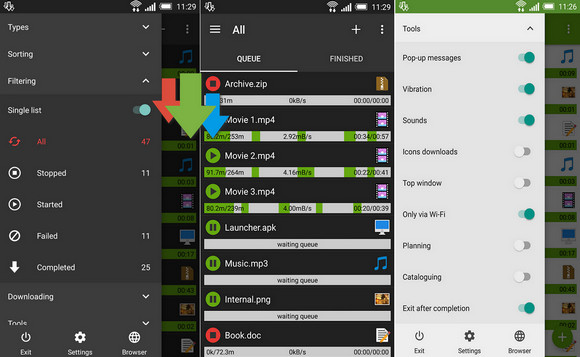
Advanced Download Manager Pro can increase your download speeds by up to 2001 Mbps. It also allows you to schedule transfers and resume those interrupted by connection losses, network problems, mobile device shutdowns, or power outages.
Features:
– up to three simultaneous downloads;
– accelerated downloads thanks to multithreading (9 parts);
– background download and resumption after pause;
– interception of links from the browser and clipboard;
– icon and task progress in the notification area;
– progress bar in overlay (adjustable opacity);
– notification by sound and vibration upon completion;
– saving settings and download list to the SD card;
– sorting file types into different folders according to extension;
– integrated browser for sites requiring a deposit;
– interception of mp4 videos from web pages;
– customizable interface and themes;
– scheduling of downloads by time;
– widget for the home screen;
– creating profiles for websites;
– and much more…
To add links from the browser:
– click on the link and choose ADM Editor in the “Continue with” window;
– long press on the link, choose “Share” and select ADM Editor from the “Share link” list;
– copy the link, the program will intercept it from the clipboard and send it to ADM Editor;
Controls:
– press the download button to pause/resume;
– press on the complete download to open the file;
– long press on a download to display the context menu.
- Version : Complete
– Compatibility: Android 2.3.3 or higher
- Language : English
- Size : 1.6 MB
This article was updated on November 17, 2016