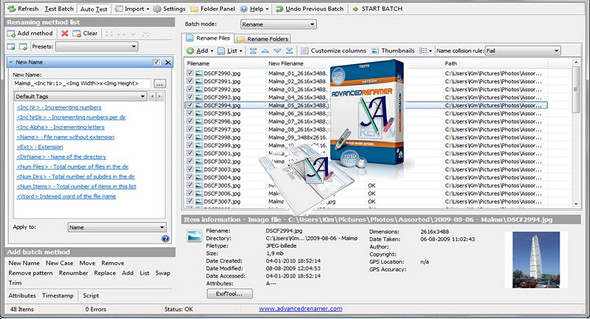
Advanced Renamer is a program for renaming multiple files or folders at once. It can use several different methods to calculate the new name, including multimedia tools for audio and image files. Advanced Renamer facilitates advanced batch jobs by using multiple methods on a large number of files. The eight different methods allow you to modify file names, attributes, and timestamps in a single operation. With Advanced Renamer, you can construct new filenames by adding, deleting, replacing, changing the case, or renaming the file based on known information about the file.
This program is an excellent tool for organizing digital images for both professionals and beginners. The thumbnail view lets you display thumbnails directly in the file list, giving you control over the renaming process. With this program, you can rename all your photos in a snap.
With Advanced Renamer, you can change the names of your favorite music files to more appropriate names using the built-in ID3 functions.
Key features of Advanced Renamer
Batch Rename
Rename hundreds or thousands of files and folders simultaneously according to your custom rules. Ideal for organizing photo, video, or music collections.
Multiple renaming methods
More than 10 built-in methods: adding, deleting, replacing text, changing case, automatic numbering, renaming, external list, regular expressions, etc.
Use of metadata
It uses EXIF (photos), ID3 (music) or codec (video) information to automatically rename files based on date, artist, resolution or duration.
Preview and secure cancellation
Each action is previewed before execution; you can check the result and cancel the renaming at any time without risk.
Integrated GPS mount
For photo files containing coordinates, Advanced Renamer can automatically add the city name, country name, or GPS coordinates to the file name.
Renaming multimedia files
Reading and using audio, video and image metadata: codec, artist, title, album, duration, resolution, etc.
Automated conversion, copying, and moving
In addition to renaming, the software can copy, move, or sort files into specific folders according to your rules.
Regular expressions and custom scripts
Use advanced rules and JavaScript scripts to create complex renaming patterns tailored to your business needs.
Importing lists (CSV/TXT)
Allows importing lists of names from an external file to apply a predefined renaming scheme.
Intuitive and multilingual interface
Clear interface, translated into several languages (including French), with drag-and-drop support and thumbnail display for images.
Extended compatibility
Works under Windows 10 and 11 (and macOS version available), with support for most common file formats.
Version : 4.20 Commercial
Language : Multilingual (French included)
Size : 27.27 MB
Configuration:
– Windows (x64 Bits): 7, 8, 8.1, 10, 11
Download Advanced Renamer v4.20 + Portable
This article was updated on January 21, 2026