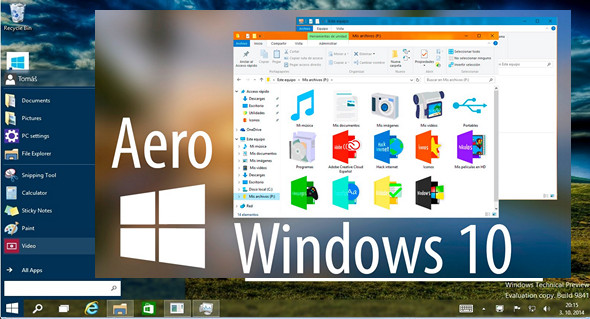
Aero Glass integrates seamlessly with the Windows desktop environment without impacting system components. It utilizes the native Direct3D device for rendering effects and colors. You can adjust transparency and base colors directly from the Windows Color Control Panel.
This utility replicates the full glass effect in window frames.
– Apply a glass-like appearance to the window frames
– Blur the content behind borders to improve the user interface experience
– Change the amount of transparency directly in the Control Panels
– Change the inactive color of window borders
– Skin windows and borders (add glow, shadows, etc.) without changing the Windows theme
– Fully native, including MSStyle themes and DWM API compatibility
– Low resource utilization
Glass style
Your windows will be rendered with transparent borders. This allows you to see what's behind the edge. The key element is blurring the content behind the glass edges to prevent it from being too sharp and distracting. The result is a very clever window border!
Fully native
The utility is fully integrated into the desktop Window Manager without interrupting system protection or modifying system files. All rendering is performed via a native Direct3D device. All color settings adjusted in the Windows Control Panel are preserved. Use the color intensity slider to adjust the amount of transparency.
No custom skinning engine used.
Due to the native nature of this theme utility, Windows is rendered with the glass effect. All features controlled via the DWM API (e.g., DwmEnableBlurBehindWindow or DwmExtendFrameIntoClientArea) are supported, including the taskbar and custom Start menu effects.
Low resource utilization!
This library tries to utilize all available DWM resources as much as possible to minimize RAM and VRAM usage. No redundant objects are created, and no background services run (Win8 only; the Win8.1 version requires a lightweight background process to properly load user settings). The result is a lightweight library that behaves exactly like Aero Glass in Windows 7. No performance degradation!
Theme your windows!
You can completely change the appearance of your window borders without affecting your Windows theme or using an unsigned theme. This allows you to reinstate various effects such as window shadows, caption glow effects, rounded borders, or simply change the appearance of caption buttons. All you need to do is edit a single bitmap in your preferred image editor, and everything will look exactly as you want!
Configuration:
– Windows (x64 Bits): 10
– Processor: 1 GHz
– RAM: 512 MB
– Disk space: 10 MB
Facility :
1. Start the installation simply by clicking on Aero Glass for Windows 10 1.5.3 x64.exe
2. Do not perform the update.
Language Multilingual
Size 4.6 MB
This article was updated on March 24, 2017