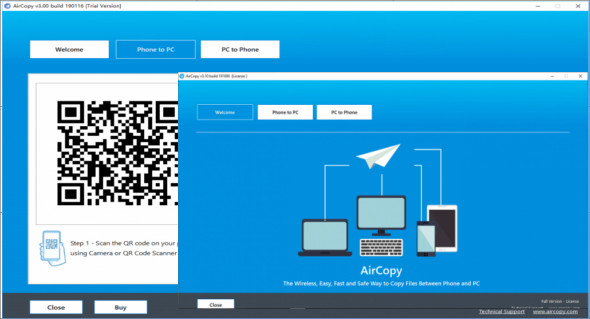
Aircopy is a very useful utility for sharing files between mobile phones and computers. It allows you to transfer files from your phone to your PC or from your PC to your phone via fast and secure wireless transmission.
The program is easy to use and has a clear, user-friendly interface. It works for both Android and iPhone. Download AirCopy to your computer and scan the QR code in the transfer files on your phone.
3 Easy Steps to Transfer Files Between Your Computer and Your Phone:
Step 1: Scan the QR code on your phone.
Run AirCopy on your computer, then use your phone's camera or the QR Code Scanner app to scan the QR code displayed on the AirCopy software.
Step 2: Select the files to transfer from the phone.
Select the files on your phone. It supports photos, videos, documents, and other file types.
Step 3: The files are immediately transferred to the computer.
The files you selected on your phone will be transferred to your computer almost immediately. You can then view, edit, or use the files on your computer.
Aircopy features:
– An application for transferring files between mobile phones and PCs.
– Transfer files from phone to PC or from PC to phone via wireless connection.
– Wi-Fi usage: no cable connection between the phone and the PC
– No app downloads on the phone, no Bluetooth pairing.
– Simple and quick installation process.
– It has a very good user interface and an intuitive design.
– Near-instant file transfer between phone and PC.
Version : 3.10 Build 191006
Language : English
Size : 10.43 MB
Configuration:
– Windows (x32/x64 Bits): 7, 8, 8.1, 10
– Processor: 1 GHz
– RAM: 1 GB
Aircopy 3.10 Build 191006 + Portable
This article was updated on February 24, 2020