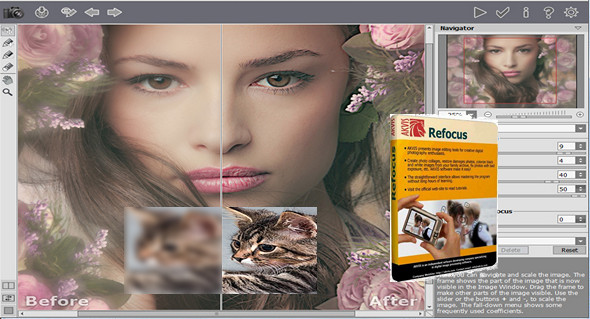
AKVIS Refocus is a software specializing in improving image sharpness; it offers five modes to correct the entire image or to sharpen a specific area: Sharpness correction, Tilt-Offset, Diaphragm blur, Motion blur, And Radial blur.
It is also possible to add bokeh and lens blur effects to your photos, which will make the photo more distinct and impressive.
You don't need any special knowledge to get good results. The software is easy to use, and the program offers a large number of presets. You can observe the result in real time and compare the "before/after" states, allowing you to visualize the adjustments made to focus, sensitivity, intensity, and the addition of blur to certain parts of the photo to sharpen another area.
AKVIS Refocus is available as a standalone application and as a plugin filter. The plugin version is compatible with Adobe Photoshop, Photoshop Elements, Corel Paint Shop Pro, Corel Photo-Paint, Corel PhotoImpact, Serif PhotoPlus, Xara Xtreme, and GIMP v.2.4.5+.
New features in version 7.0
AKVIS Refocus 7.0 offers two new modes – Motion Blur and Radial Blur – allowing you to create the illusion of linear or radial movement. In addition, the new version features an improved Defocus effect and additional presets.
Configuration:
– Windows (x32/x64 Bits): XP, Vista, 7, 8, 8.1, 10
– Processor: 1 GHz
– RAM: 512 MB
– Disk space: 100 MB
Facility :
1. Install the software akvis-refocus-setup-x.exe (x64/x86 depending on your system).
2. Run the patch b2b7b1-patchakvisall.exe and go to the installation location, by default:
“C:\Program Files (x86)\AKVIS\Refocus", and click on " Select folder" .
3. Launch AKVIS Refocus and click on " Test » (2147483647 days remaining).
Language Multilingual (including French)
Size : 109.9 MB
This article was updated on March 30, 2017