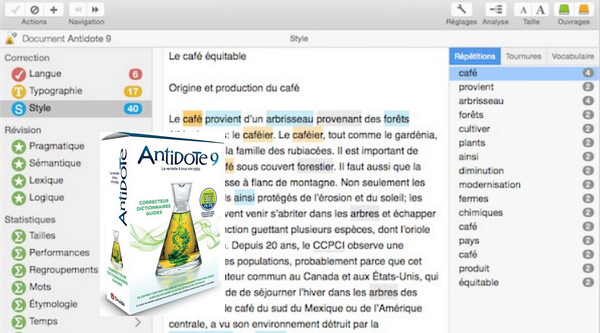
Antidote 9 introduces a new style correction feature, carefully calibrated to visually identify repetitions, awkward phrasing, and weak vocabulary. Dialogues are now recognized, and certain detections can be suppressed within them. Ignored detections are saved, allowing you to resume proofreading a long document exactly where you left off.
The dictionary of definitions features a streamlined and expanded glossary, including a new section on difficulties covering 30,000 entries that clearly illustrates, for example, the agreement of the past participle of each reflexive verb. More than 11,000 web links lead to geographical maps and satellite images of countries, cities, and World Heritage sites. And new, intelligent links, which can be expanded at will, extend searches to valuable external resources such as the Grand dictionnaire terminologique of the Office québécois de la langue française.
The unprecedented display of 2.6 million etymological relatives sheds light on surprising historical connections, such as "tueur" (killer) and "tutor" (tutor), both derived from the Latin "tueri." More than 1,500 new words have been added, including "claquade" (slap), "égoportrait" (self-portrait), and "vapoter" (to vape), along with 5,000 synonyms, 38,000 co-occurrences, and 600,000 semantic field links. On the guide side, new articles bring the total to over 825, which benefit from improved search functionality and a more user-friendly interface.
For the first time, Antidote extends its expertise to another language. An optional module, designed specifically for French-speaking Antidote users, adds English correctors, dictionaries, and guides of the same richness and quality as their French counterparts. The result is a comprehensive and cohesive Antidote, where the vast knowledge base of French and English coexists elegantly, from simultaneous correction of both languages to seamless switching between them in the dictionaries and guides.
Antidote 9 integrates with:
– MS Office 2007, 2010, 2013, 2016 (Excel, Outlook, PowerPoint, Word)
– Internet Explorer 10, 11
– Windows Live Mail 2011, 2012
– Google Chrome* 52
– Firefox* 49
– Firefox ESR* 38, 45
– Thunderbird* 45
– Google Docs (text only; Internet Explorer, Firefox, Google Chrome)
– Hotmail (Internet Explorer, Firefox, Google Chrome)
– Yahoo Mail (Internet Explorer, Firefox, Google Chrome)
– Gmail (Internet Explorer, Firefox, Google Chrome)
– Postbox* 2.5, 3.0
– GroupWise 8, 2012, 2014 (default editor)
– Illustrator CS5, CS6, CC, CC 2014, CC 2015 (19.0)
– InCopy CS5, CS5.5, CS6, CC, CC 2014, CC 2015 (11.0)
– InDesign CS5, CS5.5, CS6, CC, CC 2014, CC 2015 (11.0)
– LibreOffice* 4.4, 5.0 32-bit (Writer, Calc, Impress, Draw)
– WordPerfect X4 to X8
– WordPad
– Notepad
– TeX and LaTeX formats (except macros)
– RTF (via WordPad) and text formats
Features of the integrated display:
– 6000 large-format illustrations
– Integration of illustrations into 8000 definitions
– Over 9000 links from definitions to illustrations
– Detailed illustration of 20,000 terms
– Pronunciation of 20,000 terms
– Definition in context of 20,000 terms
– Printing the illustrations
– Export of illustrations for personal use
Configuration:
– Windows (32/64 Bits): 7, 8, 8.1, 10
– Processor: P4 3GHz
– RAM: 2 GB
– Disk space: between 4.5 and 7.5 GB depending on the language chosen
Facility :
It is recommended to uninstall all previous versions of Antidote and the integrated Visual before installing this version.
1) Install Antidote 9 v4 using the file:
" Setup Antidote 9.exe"
2) If you wish, you can install the integrated visual using the following file:
" Optional – Integrated Visual Setup.msi"
This version is pre-activated and contains all updates as of [date].October 2016.
- Language: French / English
- Size: 1.3 GB
This article was updated on October 18, 2016