Using App Cloner you can create and install multiple copies of your existing applications.
Cloned applications run in parallel and independently of their original counterparts. They will not receive automatic updates, so you can keep and run a stable version alongside the original application.
App cloning can be useful for using multiple connections simultaneously in apps like Facebook, Twitter, or Skype, but the real fun starts with messing around with an app. App Cloner offers a multitude of modding options to fine-tune the new copy of the app.
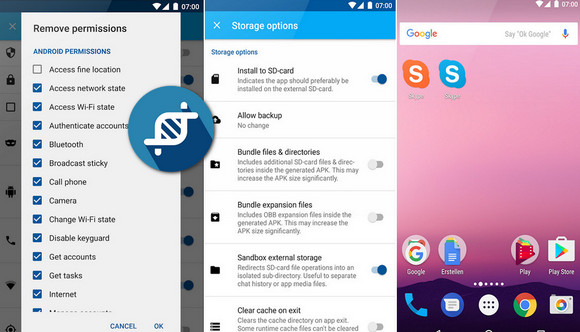
You can change the application name and icon. You can revoke permissions or allow a cloned application to be installed on the external SD card. You can disable automatic startup, app backups, or default startup of intrusive applications.
App Cloner can even extend a cloned app to add new features such as password protection, incognito mode with secure file deletion, hiding IDs, or spoofing Android locations. You can also force the app to use data only on a Wi-Fi connection.
Each new updated application of Cloner will add more options.
Premium version features
The free version allows basic cloning. Upgrade to premium to enjoy the full range of options:
* WhatsApp and Facebook Messenger clone
* Create multiple application clones and batch cloning
* Save or share cloned applications
* Replace the launch icons
* Clone watch applications or dials
Display option:
* Change of state, navigation and color toolbar
* Change the rotation lock
* Change the application language, font, and font size
* Keep the screen on, immersive mode
* Enable multi-window support, change window size
Privacy options:
* Remove application permissions
* Password-protected applications
* Incognito mode for apps
* Exclude the application of recent apps
* Change Android ID, hide IMEI, Wi-Fi MAC
* Prevent the application from appearing in screenshots
* Spoof Location
Storage options:
* Allow applications to install on the external SD card
* Allow/prevent app backups
* External storage sandbox
* Clear the cache on exit
Launching options:
* Remove widgets, launcher icon
* Automatic startup Disable
* Application default Disable
Networking options:
* Mobile data Disable
* Background networking Disable
* SOCKS proxy (route traffic via proxy)
Notification options:
* Notification filter
* Notifications Silence
* Change the notification color
Automation options:
* Overall brightness or mute at startup
* Do not disturb, Wi-Fi and Bluetooth controls
* Tasker integration
- Version : Complete
– Compatibility: Android 4.0.3 or higher
- Language : Multilingual
- Size : 3.11 MB
This article was updated on November 29, 2016