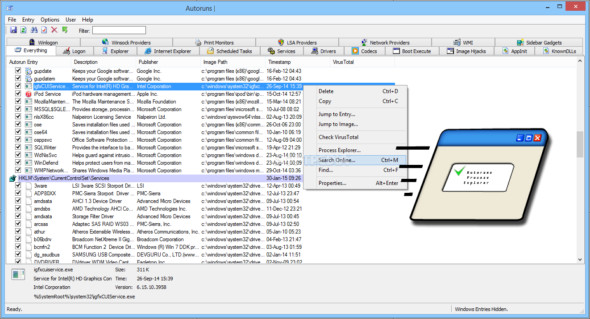
Autoruns, this utility tells you which programs are configured to run when the system starts or logs on, as well as for starting various built-in Windows applications such as Internet Explorer, Explorer, and media players.
Autoruns reports on Shell Explorer extensions, toolbars, browser helper objects, Winlogon notifications, autostart services, and more. The download package also includes a command-line equivalent that can be generated in CSV format, Autorunsc.
You will probably be surprised by the number of executables launched automatically!
Simply run Autoruns to view currently configured startup applications, along with a complete list of registry and file system locations available for startup configuration. Autoruns displays startup locations including login entries, Explorer add-ins, Internet Explorer add-ins (including Browser Helper Objects - BHOs), Appinit DLLs, image hijacks, boot images, Winlogon notification files, Windows services and Winsock layered service providers, codec providers, and more. Switch between tabs to view startups from different categories.
To view the properties of an executable configured to run automatically, select it and use the Properties menu item or the toolbar button. If Process Explorer is running and an active process is executing the selected file, the Process Explorer menu item from the Input menu opens the process properties dialog box for the process running the selected image.
Access the location of the displayed registry or file system, or the configuration of an autostart item, by selecting it and using the Go to Entry menu item or the toolbar button, and then navigate to the location of the autostart image. To disable an autostart entry, clear its checkbox. To delete an autostart configuration entry, use the Delete menu item or the toolbar button.
The Options menu includes several display filtering options, such as showing non-Windows entries, as well as access to an analysis options dialog box from which you can enable signature verification, as well as sending the entire virus and file.
Select entries in the User menu to display auto-start images for different user accounts.
You can find more information about display options and additional information in the online help.
Configuration :
– Windows (x64 Bits): XP, Vista, 7, 8, 8.1, 10
– Processor: 1 GHz
– RAM: 1 GB
Language : English
Size : 3.6 MB
This article was updated on December 12, 2018