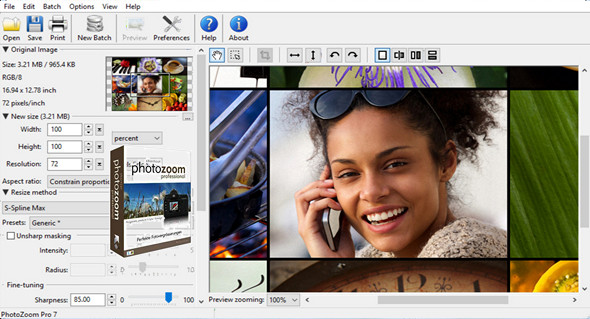
BenVista PhotoZoom uses techniques to increase and resize a digital photo up to 1 million pixels without losing quality, it also produces superior quality results.
This useful application is extremely easy to use, includes various preset parameters, and allows you to adjust the settings manually. Large quantities of images can be resized at once or in batches.
You can even create your own resizing profiles: compilations of your preferred resizing method and size settings, which can be selected with a single click. When you frequently use the same settings, resizing profiles will streamline your workflow.
PhotoZoom Pro 7 works both as a standalone application and as a plug-in for various programs, such as Adobe Photoshop, Adobe Photoshop Elements, Corel PHOTO-PAINT, Corel PaintShop Pro and Adobe Lightroom.
What's new in PhotoZoom Pro 7:
Here's a quick overview of the most important additions:
* Improved resizing method for S-Spline Max with new Brighten Shadows and Fix Overexposure filters
* Print images directly from PhotoZoom
* Now integrates with Adobe Lightroom
* Optimized presets for different types of photos and graphics
* Improved speed: even faster image processing
* A standalone application now also opens PSD images (PSD plugin already supported)
* High-DPI interface support (compatible with 4K screens)
* Official support for Windows 10, MacOS 10.12 (Sierra), Adobe Photoshop CC 2017, Adobe Photoshop Elements 15, Adobe Lightroom 6.4, Corel PHOTO-PAINT X8 and Corel PaintShop Pro X9.
Configuration:
– Windows (x32/x64 Bits): XP, Vista, 7, 8, 8.1, 10
– Processor: 1 GHz
– RAM: 512 MB
– Disk space: 50 MB
Facility :
1. Run the file PhotoZoom_Pro_7_Setup.exe
2. Register with the keygen
Portable version:
Run the Portable\ filePhotoZoomPortable.exe
Language Multilingual (including French)
Size : 32.5 MB
This article was updated on April 12, 2017