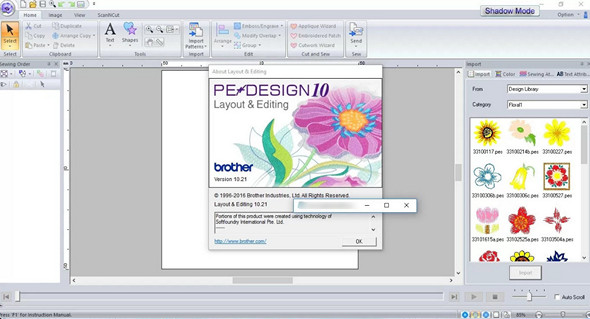
Develop creativity and simplify your design work with the new PE-DESIGN 10 embroidery design software. PE-DESIGN 10 is truly the "Perfect 10" embroidery software, with new and improved features for everyone from the hobbyist to the local entrepreneur.
Redesigned platform and embroidery assistant
A redesigned and user-friendly platform and an improved embroidery assistant, with fewer tabs and simplified features.
View design previews
There's no need to open the software to view or find embroidery designs. See thumbnail previews of your designs in Windows® Explorer. Furthermore, your designs can be launched for layout and editing or sent to the machine via USB drives. PE-DESIGN® 10 includes over 1,000 built-in designs, including 350 new ones. View these designs, and your own, with this new preview feature.
Smart color choice
New Intelligent Color Sort reduces the time you spend on the computer (manually matching color segments) and at the embroidery machine (switching threads).
More fonts… 130 Total
PE-DESIGN® 10 includes 25 additional built-in regular fonts. The program's original fonts also feature updated digitization using the latest technology.
Fabric selector
The new fabric selector automatically adjusts the stitching attributes for your embroidery based on your fabric selection.
Even better quality for PhotoStitch™
Our redesigned PhotoStitch™ includes many improvements. Easy masking, an improved preview, an enhanced "Candidate Selection," the ability to reserve colors, and more, in addition to superior stitchouts, without the need to increase the stitch count.
Enhanced preview features
The preview is also improved and the "Choose from candidates" offers more choices at your fingertips to help you produce better quality results.
Matrix copy function
Create multiples of the same design and the same type of automatic color at the same time.
Doubling the point density
Gives better results when working with puffed foam as a base.
Adjusting the direction of the point
Changing the direction of the stitch can make the same thread color different from one area to another, adding more texture and visual interest – for truly personalized designs!
Import EMG and SVG files
Vector Image Import scanning has been improved and now scans WMF, EMF and SVG with smoother results.
Configuration:
– Windows (x32/x64 Bits): XP, Vista, 7, 8, 8.1, 10
– Processor: 1 GHz
– RAM: 512 MB
– Disk space: 1 GB
Facility :
1. Install the application ped10trial_eng.exe
2. Copy/replace the contents of the folder Crack\PE-DESIGN 10 in the installation folder
3. Do not perform the update
Language : English
Size : 163.3 MB
This article was updated on July 11, 2017