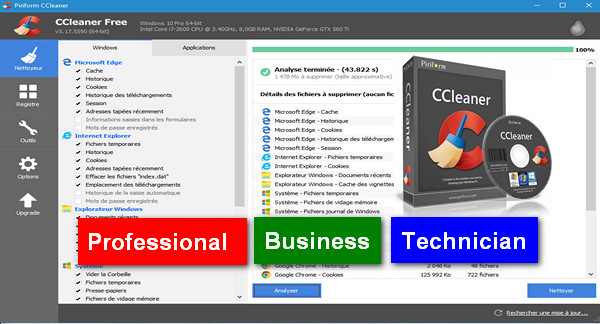
Piriform's CCleaner is a fast and easy-to-use system cleaning and optimization utility that makes your computer faster, safer, and more reliable.
CCleaner removes cookies, temporary files, and various other unused data that clog your operating system. This frees up space on your hard drive, allowing your system to run faster.
Deleting this data also protects your anonymity, meaning you can browse online more safely. The built-in registry cleaner fixes errors and incorrect settings to make your computer more stable.
In addition, a Tools section allows you to manage program installations and applications launched at startup.
Clean and well-organized interface:
The program's interface is user-friendly and easy to understand, even for those with limited experience. The main functions (Cleaning, Registry, Tools, Options) are easily accessible from the sidebar. Furthermore, since version 5.0, the software has undergone a modern design update.
Configuration:
– Windows (x32/x64 Bits): XP, Vista, 7, 8, 8.1, 10
– Processor: Pentium 4 3GHz
– RAM: 512 MB
– Disk space: 50 MB
Facility :
1. Disconnect your internet connection
2. Install the version of CCleaner (Professional / Business / Technician) of your choice
3. Use keygen for the activation which is located in the folder activator and launch 'cr-piriform.exe' (in administrator)
- Language : French
- Size : 19.2 MB
This article was updated on February 10, 2017