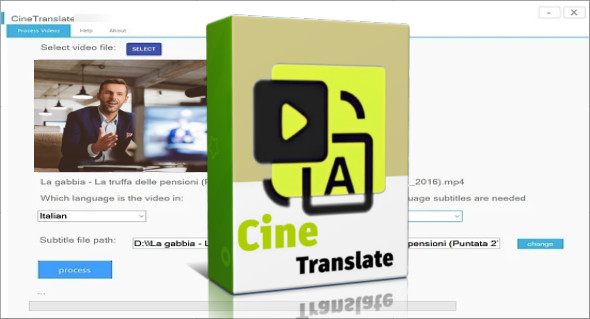
CineTranslate is an innovative machine translation solution specializing in audiovisual content. Whether you're a filmmaker, trainer, YouTuber, content editor, or subtitling professional, CineTranslate allows you to quickly and accurately translate videos into multiple languages while preserving the original style and tone. Thanks to the integration of artificial intelligence and the latest advancements in speech recognition and natural language processing, CineTranslate makes video content accessible to an international audience without requiring in-depth editing or translation skills.
Designed to meet the needs of content creators in the digital age, CineTranslate automatically converts your video audio to text, then translates it into your chosen language, while generating perfectly synchronized subtitles. With just a few clicks, you can adapt your content for international audiences, expand your reach, and improve viewer engagement worldwide. You can also use Voice Master.
Intelligent automatic translation for videos
CineTranslate relies on advanced speech recognition technology, capable of accurately detecting dialogue, even in noisy environments. Thanks to this performance, the tool generates a faithful transcription of the audio content, which is then automatically translated. Unlike simple machine translators, CineTranslate takes into account context, register, and idiomatic expressions to provide a natural and consistent translation.
Multilingual and multicultural
One of CineTranslate's major advantages is its support for dozens of languages, including English, French, Spanish, German, Portuguese, Italian, Russian, Japanese, Korean, Chinese, Arabic, and many more. This allows you to produce a video in a source language and distribute it to a global audience without having to record new audio tracks.
The tool is also capable of adapting the translation to the cultural level, by offering localized versions of subtitles or adjusting certain sentence structures so that they are understood by the target audience.
A simple and quick interface
Even without technical expertise, CineTranslate is easy to use. Simply import your video in your preferred format (MP4, AVI, MOV, MKV, etc.), select the source and target languages, and let the tool do the rest. In just a few minutes, you'll have a subtitled, translated version ready to be published on YouTube, Vimeo, or any other platform.
The exported files are compatible with standard subtitling formats such as SRT, VTT or ASS, giving you great flexibility in integrating them into your videos.
Various applications
- YouTubers and content creators Increase your audience by making your videos available in multiple languages.
- E-learning professionals : adapt your video training courses to international learners.
- Companies : communicate effectively with clients or colleagues around the world.
- Translators and editors : save time in processing multilingual projects.
- Independent cinema : offer subtitled versions of your films without going through a studio.
Security and confidentiality
CineTranslate makes it a point of honor to guarantee the confidentiality of the files processed. Videos are analyzed locally or via secure servers according to the user's preferences, and are never used for commercial purposes or shared.
Conclusion
CineTranslate is much more than a machine translation tool: it's a global distribution accelerator for video content. Thanks to its advanced transcription, translation, and synchronization capabilities, it has become an essential ally for all professionals wishing to make their content accessible to an international audience, without sacrificing quality or wasting time in post-production.
Version : 7.0.0
Language : English
Size : 7.56 GB
Configuration:
– Windows (x64 Bits): 10, 11
Download CineTranslate Portable v7.0.0
This article was last updated on April 25, 2025