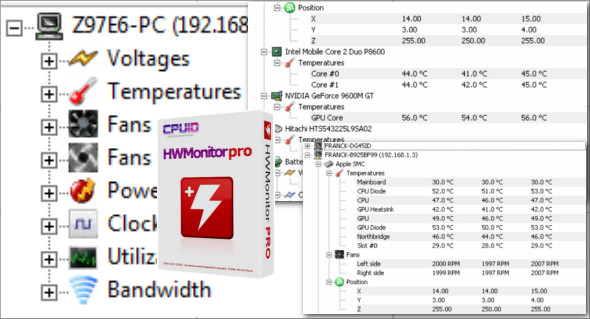
HWMonitor Pro is a simple yet powerful tool for monitoring the CPU and all its components. This program displays a detailed, real-time report in a clear and easy-to-understand window for all users.
Thanks to its tree structure, you can easily monitor every parameter. For example, you can view and track core CPU temperatures, voltage, and fan speed, while also analyzing other details such as the main hard drive assembly temperatures. The most interesting feature of HWMonitor Pro is that you can easily connect to a specific IP address or another network via a simple TCP/IP connection, allowing you to monitor sensors on one or more remote computers.
The application supports most sensor chips and only monitors components with compatible sensors, depending on the brand, motherboard model, processor, keyboard, etc. HWMonitor Pro has a user-friendly interface that allows you to automatically create graphs for each recorded session and save them as bitmap files, as well as save monitoring and SMBus data. You can also use CPU-Z
Features of CPUID HWMonitor Pro
– Monitors the health of the system.
– HWMonitor Pro portable without installation.
– The interface is understandable and easy to use.
– Provides all the information about your system.
– Can copy the information into a text document for future use.
– Helps prevent the system from overheating.
The program is fast and does not use many resources; it does not overload the overall performance of the computer and does not interfere with the functionality of other programs.
Version : Pro 1.55
Language : English
Size : 6.82 MB
Configuration:
– Windows (x64 Bits): 7, 8, 8.1, 10, 11
Download CPUID HWMonitor Pro 1.55 Portable
This article was last updated on June 6, 2025