No one is immune to equipment failure. In such cases, it can be very difficult to recover your photos, videos, and personal documents. The solution to avoid this kind of problem is to back up your data frequently.
Thanks to Cobian Backup, you will be able to back up and encrypt all your personal data efficiently and for free.
Cobian Backup is free software that is regularly updated. allows saving On demand, it can access a few folders, a partition, a disk, or an entire system. It also allows you to plan backups of all or part of a hard drive, at regular intervals or at predefined times.
Cobian Backup perfectly manages Windows volume shadow copy technology and allows you to back up to an external disk, an FTP server or a volume available on your local network.
Compatible with all versions of Windows, this program supports 256-bit AES encryptionCertainly, one of the best free backup software programs for Windows.
Create an encrypted backup with Cobian Backup
Download Cobian Bakcup hereDouble-click the executable file, then follow the installation instructions.
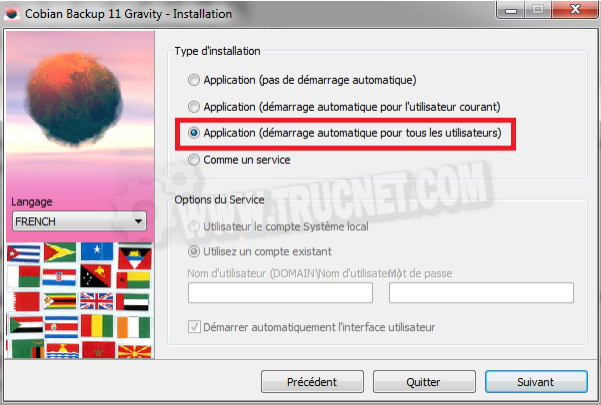
During installation, uncheck the " Like a service "to avoid slowing down your PC and check the " Application"Activate the automatic start if you wish to make scheduled backups.
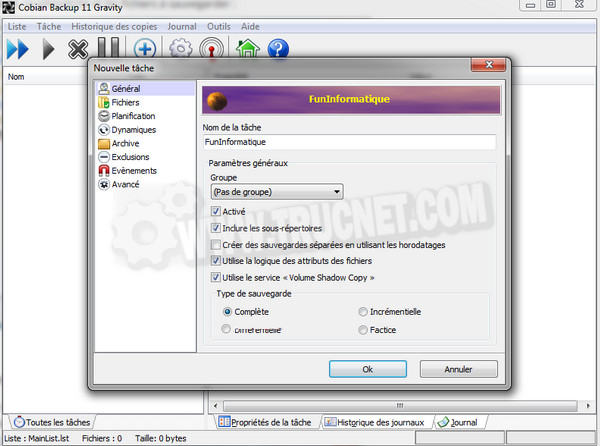
Cobian will start automatically at the end of the installation. To configure a backup, click in Stain, Then New taskGive your backup a name, then uncheck "Create separate backups using timestamps". Kind, choose incremental and do Okay twice.
In the section Files Choose the files or folders to back up by clicking on Add as well as the backup destinationThe destination can be a directory on the hard drive or a remote FTP access point!
The section Planning This setting defines the backup frequency. If you only want to back up when you want, set manually.
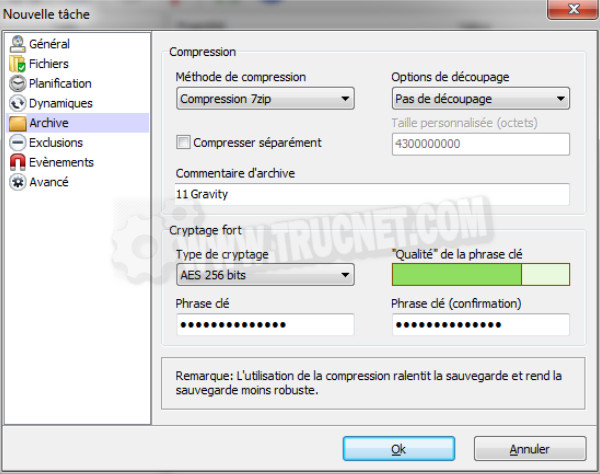
In the section ArchiveIt is possible to compress the backup to save space on the destination storage medium.
In strong encryptionput some 256-bit AES and choose a password. In Exclusion You can define rules to include or exclude certain files from the backup.
Once everything is set up, do Okay to return to the main window. Finally, click on Play to begin the compression, encryption and transfer.
This article was updated on August 10, 2021