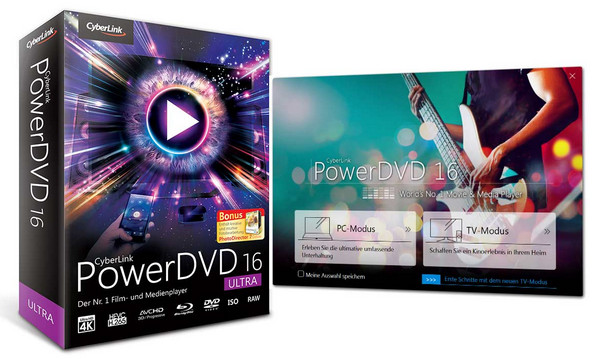
PowerDVD is an all-purpose entertainment solution that can play virtually any type of media on the market. Not only is PowerDVD an unparalleled Blu-ray, Blu-ray 3D, and DVD player, but it also delivers superior playback performance for video files and movies, including MKV, MP4, AVCHD, and XAVC-S. Furthermore, PowerDVD plays audio files in the most popular lossless formats and supports all image files. Users can even enjoy RAW images directly from their cameras without having to convert them.
Features:
TV Mode – Your movies at home! (New)
The new TV Mode lets you relax on your sofa and enjoy movies just like at the cinema. Immerse yourself in a film like never before!
PowerDVD Remote Enhanced
Settle into your sofa and use your smartphone as a remote control with PowerDVD Remote, and its new TV Mode.
Superior quality to the original
TrueTheater technology's unique enhancements dramatically improve the quality of videos, including Blu-ray discs and other high-definition video, and you'll see the difference when you watch your movies on a big TV screen. You'll get richer colors, sharper images, more detailed picture quality, and deeper, more dynamic surround sound.
Casting media on the big screen: New feature
No media player compatible with Windows 10 supports Roku®, Apple TV®, or Chromecast™ streaming. With PowerDVD 16, you can cast movies, music, or photos to your TV screen.
Enhance your multimedia device: Video, audio or photo formats not supported by Roku®, Apple TV® or Chromecast™, PowerDVD converts them in real time.
Superior quality: You can use TrueTheater technology on all streamed files to get better audio and video quality.
Wireless, simple: Videos, photos or music that you play with PowerDVD can be streamed to your TV through a Roku®, Apple TV® or Chromecast™ media device.
Enhanced 4K viewing
PowerDVD is the only Blu-ray player optimized for 4K Ultra HD screens. Intelligent rendering technology optimizes media playback on your screen, ensuring smooth and stutter-free playback, even on 4K TVs.
Cinema-quality audio playback. More formats.
For a truly immersive cinematic experience, you'll need exceptional sound. PowerDVD supports leading audio technologies like Dolby and DTS. Enjoy the acoustic difference with lossless FLAC and DSD audio formats.
TrueTheater – A new depth of engagement
Disconnect from the world with PowerDVD, the Windows 10 compatible Blu-ray and DVD player with the unique ability to enhance videos and create an exceptional surround sound environment.
Extended supported formats. Even more formats.
PowerDVD supports an exceptional number of video, audio and image formats so you can play what you want.
PowerDVD supports all new video formats and codecs, as well as all new audio formats.
Quick Start with Enhanced Instant Play
Instant Play technology has been improved, allowing PowerDVD 16 to load your movies even faster than in previous versions. Discover the difference between PowerDVD 16 and other competing software via the link below.
Super smooth slow-motion action
PowerDVD's intelligent rendering technology allows for smooth playback of videos at 120 or 240 fps. PowerDVD automatically detects your monitor's capabilities and adjusts accordingly, without requiring any additional settings.
Online Entertainment
By using PowerDVD to play online videos, you can:
Pin (Invalid img) YouTube videos to watch them offline
Watch videos offline in fast or slow motion
Group your favorite music videos into a playlist
Stream YouTube content in HD with TrueTheater HD
Watch 2D YouTube videos in 3D with TrueTheater 3D
Use YouTube's "Watch Later" feature
Customization
The customization options allow you to adjust PowerDVD to suit your needs. Hide the media panel tabs to simplify the interface and also personalize your player's background with the image of your choice.
Resuming reading
When you watch a movie, a TV series or a photo from an album, PowerDVD automatically remembers your last position and will resume playback from that point.
Configuration:
Microsoft Windows 8/8.1, 7, Vista, XP Service Pack 3 required
Processor: Intel Core2 Duo CPU 4500 @ 2.20GHz
RAM: 2 GB
Hard Drive Space: 400 MB for installation
Facility:
0. Mount the ISO file using a virtual drive such as PowerISO
1. Install the software with administrator privileges.
2. Use PowerDVD
– No activation needed because it's a volume license
- Language: Multilingual
- Size: 177.4 MB
This article was updated on August 12, 2016