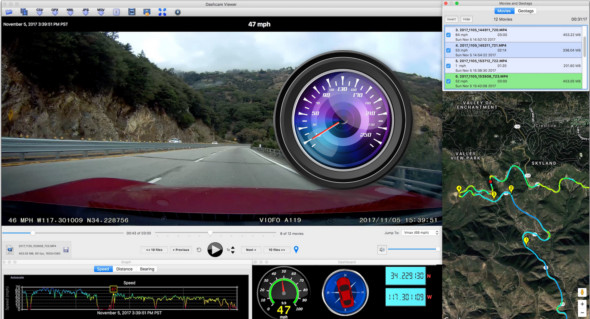
Dashcam Viewer is an app that lets you view videos and GPS data saved during dashcam recordings while simultaneously tracking your route on a Google Map. Play your dashcam videos on the main screen while viewing updated speed, distance, and vehicle location data displayed on graphs, data visualizations, and maps. Dashcam Viewer supports over 70 dashcam models.
You can export your GPS tracks to common file formats, such as CSV, Google Earth KML and GPS-Exchange (GPX) for further data analysis, and also export portions of videos to new clips and combine multiple videos into a single video.
The main window controls movie selection, playback, and data export:
– Select a movie folder
– Select individual movie files
– Export all GPS tracking data to a CSV file
– Export all GPS tracking data to a GPX file
– Export all GPS tracking data to the Google Earth KML file
– Export the view to a PNG image
– Export a portion of the film to separate the video file
– Change the display modes to two channels
– Merge several films into one large film
– Position the auxiliary windows to the right of the main window
– Recenter the film(s) within the viewer frame
– Change preferences
– Current speed
– Current date/time
– Current film scrubber
– Video file selector
– Go to the fastest point in the film or go to a specific film
– Reveal a movie in the Finder
– Current movie file name, file size, framerate
– Save or delete settings per movie
– Skip one or ten films
– Instant Repeat
– Pause/Play
– Increase/decrease the reading rate
– Advance by one or ten films
– Create a geotag
Version : 4.0.7 Plus
Language : Multilingual (French included)
Size : 254.78 MB
Configuration:
– Windows (x32/x64 Bits): 7, 8, 10, 11
Download Dashcam Viewer Plus v4.0.7 + Portable
This article was updated on September 2, 2025