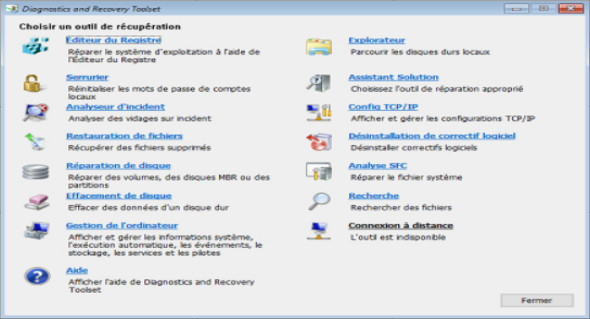
Microsoft Diagnostics and Recovery Toolset 10 (DaRT) lets you diagnose and repair a computer that won't start or is experiencing startup problems. You can use SystemRescueCd.
Using DaRT 10, you can recover unusable computers, diagnose the likely causes of problems, and quickly repair unbootable or locked computers. When necessary, you can also quickly restore important lost files and detect and remove malware, even when the computer is offline.
Microsoft Diagnostics and Recovery Toolset 10 allows you to create a DaRT recovery image in ISO and Windows Imaging (WIM) file formats and burn the image to a CD, DVD, or USB drive. You can then use the recovery image files and deploy them locally to a remote partition or a recovery partition.
Microsoft Diagnostics and Recovery Toolset 10 features:
Register editor: to modify the Windows registry.
Locksmith: to change Windows user account passwords (local accounts only, it doesn't work on Microsoft accounts)
Incident analyzer: in order to be able to read a dump file.
File restoration: to recover deleted files.
Disk repair: to repair the partition structure.
Disk erasure: to permanently delete the data from the disk.
Computer management: to open the computer manager (services, disk manager, event viewer, etc.).
Explorer: to explore/copy/move/delete the contents of hard drive(s).
Solution Assistant: to assist you in finding and correcting problems such as system startup.
Uninstalling software patch: to allow the removal of updates and uninstall.
SFC Analysis: to launch an SFC (system file integrity) scan.
Research : to search for files on the hard drive(s).
Security : to launch a Windows Defender scan.
Facility
– ISO file to be deployed onto a USB drive or burned onto a CD/DVD.
– Bootable in native mode or in UEFI mode.
Version : 9:01 PM
Language : French
Size : (x64): 795.25 MB // (x86): 608.25 MB
Configuration:
– Windows (x32/x64 Bits): Vista, 7, 8, 8.1, 10
Diagnostics and Recovery Toolset 10 v21H1 (x64)
Diagnostics and Recovery Toolset 10 v21H1 (x86)