Aiarty Video is an intelligent video optimization software designed to transform, enhance, and convert your low-quality videos to high definition, up to 4K. Thanks to artificial intelligence, it is capable of increasing resolution (upscaling), reducing digital noise, correcting blur, and even stabilizing shaky videos.
It is aimed at both users wishing to restore old videos (family, converted VHS tapes, compressed files) and digital content creators looking to produce a cleaner, sharper and smoother rendering.
AI-powered video enhancement: 1080p upscaling to 4K
One of Aiarty Video's main features is video upscaling. This involves increasing the resolution of a video file without excessive loss of quality. Unlike traditional upscaling methods, the artificial intelligence used by Aiarty analyzes each frame to reconstruct details, correct imperfections, and smooth edges.
In practical terms, a video filmed in 720p or 1080p can be exported in 2K or 4K, with a noticeable reduction in artifacts. This makes it possible to modernize old or poorly encoded videos, adapting them to high-definition screens.
Noise reduction, blurring and stabilization
In addition to improved resolution, Aiarty Video offers tools for image cleaning :
- Video noise reduction : useful for videos shot in low light or with a poor quality sensor.
- Intelligent deblurring : correction of blurry movements or missed focus.
- Stabilization : for shaky videos, especially handheld shots or footage shot while walking.
These functions use deep learning models to automatically detect anomalies and apply the necessary corrections.
A simple and intuitive interface
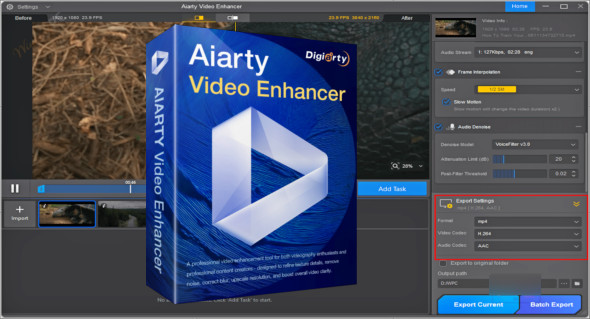
Digiarty Aiarty Video was designed to be usable by everyone, even beginners. The interface is clear, the options are well presented, and each function is explained by tooltips.
The process is simple:
- Importing the video.
- Selection of optimization effects (upscaling, stabilization, cleaning…).
- Quick preview of the rendering.
- Export to the desired format (MP4, MKV, etc.).
The user can also customize export settings, such as bitrate, video codec (H.264, HEVC), and final resolution.
A quick alternative to Topaz Video Enhance AI
It is relevant to compare Aiarty Video with another well-known software in this field: Topaz Video Enhance AITopaz is often cited as one of the best performing AI-powered video upscaling tools. However, it is more complex, more resource-intensive, and requires longer processing times.
Aiarty Video, on the other hand, focuses on speed, simplicity, and accessibility, delivering similar results in many common scenarios. For users seeking an efficient, fast, and easy-to-use tool, Aiarty is an excellent alternative to Topaz, especially for those looking to process multiple videos without spending hours in post-production.
Who should use Aiarty Video?
- THE YouTube/TikTok content creators : rapid video improvement before publication.
- THE amateur filmmakers : to enhance footage captured with entry-level cameras or smartphones.
- THE families : restoring old personal videos for projection on a large screen.
- THE image professionals : fast batch processing, without complex technical interface.
Supported formats and compatibility
The software supports most popular video formats: MP4, MOV, AVI, MKV, MTS, WMV, and FLV. It is compatible with Windows 10 and Windows 11, 64-bit. Hardware acceleration (via NVIDIA or AMD GPU) is supported to speed up processing.
Conclusion
Digiarty Aiarty Video stands out as a practical, powerful, and accessible tool for anyone looking to improve video quality using artificial intelligence. Whether you want to increase resolution, correct blur, or restore an old video, this software offers a complete and fast solution, requiring no technical training.
And for those seeking even more control over quality and detail, Topaz Video Enhance AI remains a very powerful, but more technical, alternative.
Version : 2.5
Language : English
Size : 394.92 MB / Mobile: 490.40 MB
Configuration:
– Windows (x64 Bits): 10, 11
Download Digiarty Aiarty Video Enhancer v3.3
Download Digiarty Aiarty Video Enhancer Portable v3.3
This article was last updated on December 27, 2025