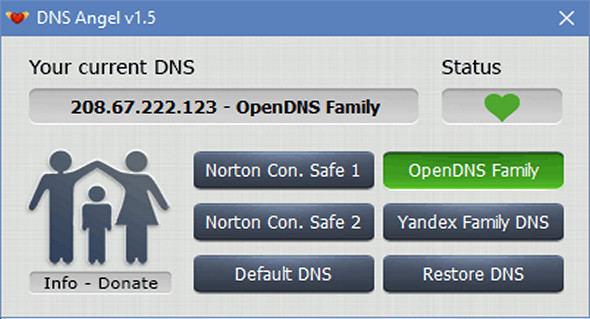
DNS Angel is a lightweight application created specifically to protect your children's online activity by automatically blocking sites with pornographic content, phishing sites and malware.
If you don't have any content filtering, you can use DNS Angel; it will protect your family from inappropriate websites. It requires no installation and can be deployed from an external storage device, and it works with all web browsers.
The process is simple: just choose one of the DNS services provided by the application with a single click, and you can return to the default settings by clicking the "Restore DNS" button.
Configuration:
– Windows (x32/x64 Bits): XP, Vista, 7, 8, 8.1, 10
– Processor: 1 GHz
– RAM: 512 MB
– Disk space: 1 MB
Portable version:
Launch the file DnsAngel.exe
Language : English
Size : 0.44 MB
This article was updated on May 20, 2017