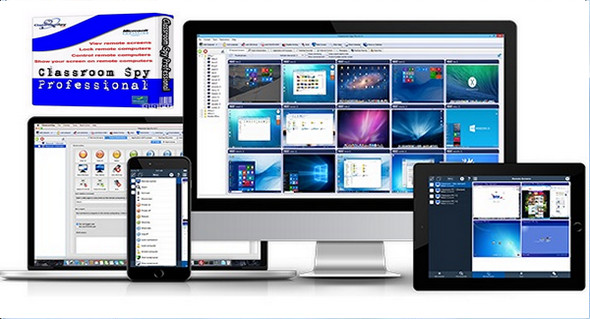
Take control of remote computers with Classroom Spy Professional. Take classroom management to the next level. This software lets you see what everyone is doing—without leaving your desk. You can monitor the activity of all your students' computers remotely. Furthermore, you can share your screen with your students' recording activity, control computers, give demonstrations, limit internet usage, block applications, and much more.
You will be able to take control of their PC by directly controlling their mouse and keyboard using the assistance function. Finally, actions such as disabling, locking, or restarting will be possible from your own computer.
What are the main advantages of using Classroom Spy Pro?
* Installing and using the application is very simple as all functions are accessible in just a few mouse clicks.
* You have total control over what remote users do.
* You can give the presentation by showing your screen live to the students or by showing the student's screen to others.
* The screens of the remote computers are represented in the table with a customizable number of rows in the form of thumbnails.
* Perform multiple actions on all remote computers by clicking
* Block applications and internet access
* Log of visited web pages
* Log applications used
* Logging keys – keylogger
* Display a live image from a remote computer.
* You can take control of a remote computer by controlling its mouse and keyboard.
* More distant screens can be displayed in a table.
* Computers can be organized into computer groups (for example, classrooms)
* A remote screen can be zoomed to its actual size.
* The name of the logged-in user is displayed.
* Record the screens of remote computers to MPG4 files.
* Show your desk to the students or show the students' desks
* Powering on/off, restarting, hibernating, suspending remote computers
* Disconnect desktop users
* Lock the workstation
* Clear the desktop
* Control screensaver
* Block the Internet
* Block apps
* Disable remote computers
* Limit the audio volume level of remote computers
* Disable printing
* Disable Ctr + Alt + Del
* White screen
* Run the program on the remote computers and view the output
* Open a web page on remote computers
* Supports multiple monitors
* Monitoring of running processes and applications
* You can lock selected remote computers
* You can display a message on selected remote computers.
* When bandwidth is lower, the refresh interval can be increased.
* Automatic connection to a remote computer is optional.
* The agent settings are encrypted and password protected.
* The connection to a remote computer is protected by a password.
* Access to console monitoring is password protected. If more than one user uses the same computer, different profiles and access passwords can be set.
* Multiple monitoring consoles can be connected to the same remote computer – you can monitor your students from different locations.
* The agent can be installed remotely.
* Fast user switching is supported.
* Multi-session support for Remote Desktop, Terminal Services, Citrix, …
* The console can be used on a smartphone or tablet
What's new in Classroom Spy Pro 4:
– Classroom monitoring – view live screens from all student computers
– Show your screen to the students
– Take control (mouse and keyboard) of the student's computer
– Lock all student computers to attract attention
– Record remote computer screens to AVI files
– Execute various tools such as power off, restart, hibernate, lock the workstation…
– Prevent internet browsing (block ports, block/allow individual websites)
– Starting or stopping applications and processes on remote computers
– Monitor thin clients and Terminal Server (RDP) service sessions
– Can be configured and installed remotely
– Works over LAN, WLAN, VPN and the Internet
– Password protected
– Supports multiple monitors
Configuration:
– Windows (x32/x64 Bits): XP, Vista, 7, 8, 8.1, 10
– Processor: 1 GHz
– RAM: 512 MB
– Disk space: 70 MB
Facility :
1. Install the program Setup.exe
2. Copy/Replace the file csp_console.exe in the installation folder (in the folder bin)
Language : English
Size : 32.9 MB
This article was updated on February 23, 2017