Universalis is the world's encyclopedic reference.
In just a few clicks, you can access the most up-to-date information and the latest discoveries, written by the best specialists in each discipline: teachers, personalities from the cultural and scientific world…
For the 22nd edition, Universalis 2017 is now available on USB key, a new, more modern, simpler and more functional format!
* 7,400 authors and advisors from all fields of knowledge
* More than 350,000 documents
* More than 35,000 media items: photographs, drawings, videos, animations, sounds, etc.
* Eight search modes
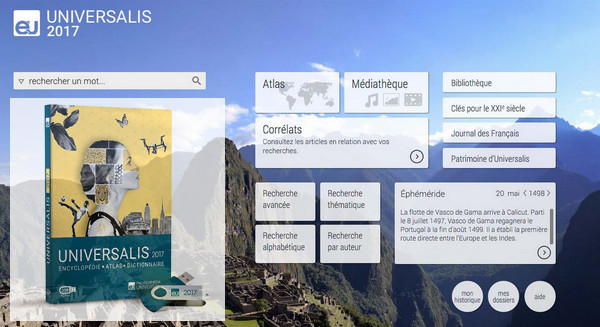
* A new research tool: CORRELATS
A new, simpler and more intuitive interface
Configuration:
– Mac / Windows (x32/x64 Bits): XP, Vista, 7, 8, 8.1, 10
– Processor: 3GHz
– RAM: 2 GB
– Disk space: 20 GB
Facility :
1. Plug in a 16 GB mini USB flash drive
2. Deploy the Universalis key image using the tool Rufus supplied and with the configuration shown in the screenshot (eu2017_rufus.jpg).
3. Install EU2017 by following the official procedure available on the key
To configure rufus-2.11p.exe, open the JPG file located in the downloaded folder and match all the settings, then create the installation USB drive. Once finished, go to your USB drive and launch the installation using installeruniversalis2017.exe.
- Language : French
- Size : PART 1/2/3 3.9 GB Part 4: 3.2 GB
– Total size: 14.9 GB
Uptobox
DOWNLOAD PART 1 Uptobox server
DOWNLOAD PART 2 Uptobox server
DOWNLOAD PART 3 Uptobox server
DOWNLOAD PART 4 Uptobox server
1File
This article was updated on December 7, 2018