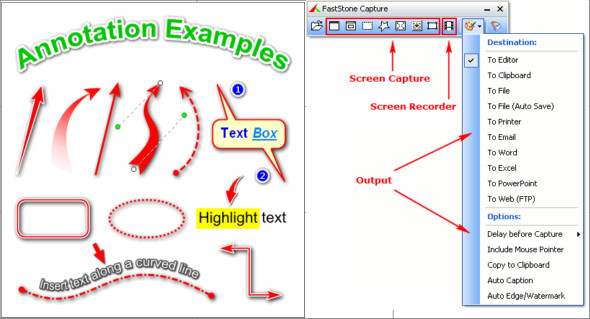
FastStone Capture is a powerful, lightweight, and comprehensive screen capture and video recording tool. It allows you to easily capture and annotate anything displayed on the screen, including windows, objects, menus, the full screen, rectangular/freehand/fixed areas, and scrolling windows/web pages.
It also allows you to record all on-screen activity, including screen edits, microphone input, mouse movements, and clicks, into highly compressed video files. You can choose to send captures to an editor, file, clipboard, printer, email, a Word/PowerPoint document, or upload them to your website.
Editing tools include annotation (text, arrows, highlights), resizing, cropping, sharpening, watermarking, applying outline effects, etc. Other features include image scanning, global keyboard shortcuts, automatic filename generation, support for external editors, a color picker, a screen magnifier, a screen crosshair, and a screen ruler.
FastStone Capture saves images in BMP, GIF, JPEG, PCX, PNG, TGA, TIFF, and PDF formats. The built-in screen recorder records videos in WMV (Windows Media Video) format. You can also use WinSnap + Portable.
Features of FastStone Capture
– A small, convenient capture panel offering quick access to its capture tools and output options
– Global shortcut keys to instantly activate screenshot
– Capture windows, objects, menus, full screens, rectangular/freehand areas, and scrolling windows/web pages
– Capture multiple windows and objects, including multi-level menus
– Record on-screen activities, including on-screen changes
– An integrated video editor
– Options to specify the output destination (internal editor, clipboard, file, printer…)
– Draw annotation objects such as text, arrow lines, highlights, watermarks, rectangles, and circles
– Apply effects such as drop shadows, frames, torn edges, and faded edges
– Add a legend
– Resize, crop, rotate, sharpen, brighten, adjust colors…
– Support tabs allowing you to capture and edit multiple screenshots simultaneously
– Supporting external publishers
– Acquire images from the scanner
– Convert images into a multi-page PDF file
– Join images side by side to produce a single image file
– Send captured images by email
– Send captured images to Word and PowerPoint documents
– Sending captured images to a web server (FTP)
– Screen color selector
– Screen magnifier
– Screen ruler
– Supports multiple monitors
– Run at Windows startup (optional)
– Reduce the area in the notification area
– Small in memory
– And much more…
Version : 11.2
Language : Multilingual (French included)
Size : 22.56 MB
Configuration:
– Windows (x32/x64 Bits): 7, 8, 10, 11
Download FastStone Capture v11.2 + Portable
This article was last updated on November 29, 2025