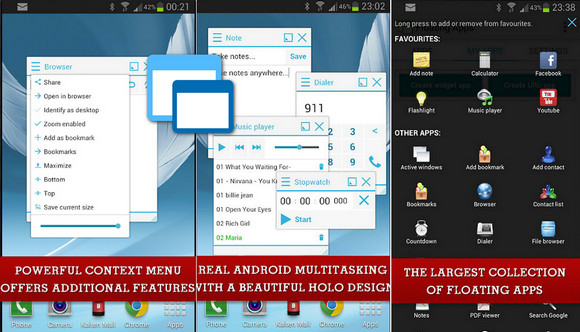
You can now create your own floating applications from widgets or any URLs!
Floating Applications – The largest collection (31) of floating apps available on Google Play and the only one that lets you create your own floating apps from widgets and URLs! Each floating app is a small application that opens in a window and floats on top of all other apps, enabling true multitasking on your Android phone or tablet. Simply open the floating app and experience multitasking just like on your PC or Mac. Move, resize, maximize, minimize, and use floating windows so you don't have to leave your current app for a quick extra task—that's exactly what floating apps are all about! It's like the multiview/multi-window option on Samsung phones, but for all of Android!
Floating applications available:
– Floating App Applications
– Floating App Active Windows
– Floating App Add to favorites
– Floating App Bookmarks
– Floating Browser App
– Floating Calculator App
– Floating Dialer App
– Floating Flashlight App
– Floating App Launcher
– Floating App Google Search
– Floating App Wikipedia Search
– Floating Stopwatch App
– Floating App System Information
– Floating App Video Player
– Floating App Add Contact
– Floating App Add Note
– Floating Contact List App
– Floating Countdown App
– Facebook Floating App
– Floating File Explorer App
– Google Plus Floating App
– Floating Image Viewer App
– Floating Music Player App
– Floating Notes App
– Floating PDF Viewer App
– Floating Task Killer App
– Floating Translator App
– Twitter Floating App
– Vimeo Floating App
– Floating App Wifi Manager
– Floating YouTube App
* Or create your own floating applications from widgets or URLs
Visit http://www.floatingapps.net for more details…
- Version : Complete
– Compatibility: Android 4.0.3 or higher
- Language : Multilingual
- Size : 16.8 MB
This article was updated on November 18, 2016