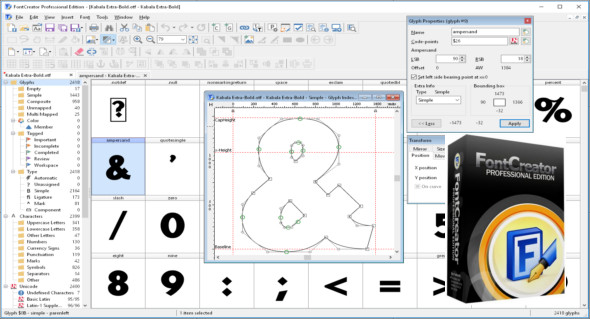
FontCreator Professional contains powerful drawing tools that graphic designers need. It's a professional font editor that lets you create and edit TrueType and OpenType fonts. It has an easy-to-use interface that allows beginners to become proficient instantly.
With FontCreator, you can correct character assignments, font names and spacing pairs, and you can always preview fonts before installation.
When you create or open a font, FontCreator displays a summary of all available characters. You can easily add missing characters, select an existing character, and modify its appearance. You can import (or delete) photos of your signature or company logo, or create a line from your handwriting.
Features of FontCreator Professional 12
– Create and edit TrueType and OpenType fonts
– Redesign of existing characters
– Add missing characters
– Add up to 65,535 glyphs per font
– Import vector files (EPS, AI, PDF, etc.) and bitmap images (BMP, GIF, PNG, etc.)
– Modify and regenerate font names
– Correction of character mappings
– Correct any fonts that are not displaying correctly
– Convert OpenType fonts to TrueType fonts
– Generate, modify, import, export and clean kerning pairs
– Add or correct more than two thousand composite glyphs
– transform individual glyphs or an entire font (for example, to create a bold version)
– Extract TrueType fonts from TrueType collections
– Unicode support (including private use zone and additional aircraft)
– All common encodings and code pages supported (ANSI, ASCII, Unicode, Symbol, Big5, PRC, Wansung, etc.)
– Preview the fonts before installing them
– Install fonts under Windows
Configuration :
– Windows (x32/x64 Bits): XP, Vista, 7, 8, 8.1, 10
– Processor: 1 GHz
– RAM: 1 GB
Language : English
Size : 35.7 MB
This article was updated on May 7, 2019