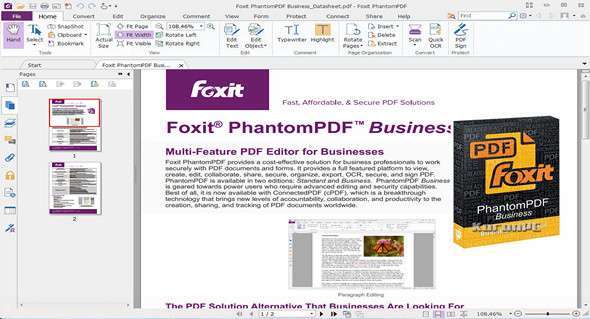
PhantomPDF Business is a complete PDF editor with advanced editing features.
Edit the text
Edit the text of a paragraph without worrying about the formatting: the text will be automatically redistributed as you edit. After editing, check the document for spelling.
Advanced text editing
Advanced editing capabilities for PDF documents with more complex layouts. Link, join, or split text blocks to connect text for more powerful editing. Move and resize text blocks to achieve a more compelling layout.
Advanced object modification
Modify images, objects, and object shading. Change text to a shape. Modify layout properties, add shading to objects, convert text to paths, merge/split text, and edit .ai files.
Edit and format the text
Modify the font of the PDF text by changing the type, style, size, color, and effect. Align the text left, center, or right, while choosing from several line spacing options.
Professionalizing documents
Personalize the presentation of your PDF by adding or modifying stamps, watermarks, headers, footers, and backgrounds to generate professional-quality PDFs.
Insert objects, images, and videos
Embed images and videos in your PDF and make it more interactive. Align objects to the left, middle, or center. Distribute objects horizontally or vertically. Rotate, flip, or shear objects.
Create a standard PDF file
Create PDFs from hundreds of the most common file types, compatible with other PDF products. Reduce file size before distributing or archiving to save transfer time and disk space.
Export PDF to Word and other formats
Easily share PDF content by exporting to MS Word, PowerPoint and Excel, RTF, HTML, XML, text and image formats.
Create a PDF file from Microsoft Office, Outlook and Visio
Create PDF files with fully integrated and functional Word, PowerPoint, Excel, Outlook and Visio add-ins.
PDF form generation
Develop PDF forms quickly and easily with automated form field recognition and the design wizard. Create professional-looking forms with push buttons and radio buttons, checkboxes, combo boxes, list boxes, and text and signature fields.
PDF Portfolios
View, print, create, edit and search text in PDF portfolios.
PDF / A, E, X Compliance
Create and validate industry-compliant PDF files for archiving, engineering, and print production.
Shared Examination
Initiate a shared review to include PhantomPDF, Foxit Reader, and MobilePDF users via a public cloud (Foxit Cloud), network folder, SharePoint workspace, or email.
Commenting tools
Provide feedback to documents using annotation and text markup tools.
Comment Management
Quickly view all comments on a document in an easy-to-understand summary. Import, export, and send comments as FDF files via email.
SharePoint Integration
Easily archive and retrieve PDF files on SharePoint servers.
DocuSign integration
Send, sign and save PDF documents using the industry's most widely used eSignature solution.
Evernote integration
Create and send a PDF file as an attachment to an Evernote note.
Manage PDF document pages
Allows you to delete pages, add pages, swap, flatten, crop and extract pages in a PDF document.
Create a PDF from an existing PDF file
Add, delete or combine pages from multiple PDF files to create new PDF documents.
Compare PDF documents
Use color to highlight the differences between two PDF documents to help you quickly and easily identify what has changed.
Search for PDFs by content
Group search and plug-in indexing for Windows desktop search allows PDF searching by content, title, subject, author, keywords, annotations, bookmarks, attachments, etc.
Numbering
Place the identification on the documents as they are scanned or processed.
Reorganize PDF documents
The page and attachment panels allow you to organize pages and attachments by simply dragging and dropping page thumbnails within a document or from one document to another.
Scan documents to PDF
Streamline your workflow by converting paper contracts, agreements and other documents into electronic PDF files – scan and convert in one step.
Optical Character Recognition (OCR)
OCR to convert scanned content or image into selectable, searchable and editable text.
Editing text in scanned documents
OCR with editable text, edit paragraph text from scanned documents, which is especially useful when you only have the paper copy.
Correct suspicious OCR results
Find and correct incorrect OCR results to enable accurate file indexing for efficient PDF searching.
Scanned pages in an existing PDF file
Streamline your workflow by inserting scanned documents directly into your PDF document.
Sign documents with PDF Sign
Sign documents in your own handwriting. Create, manage, place, apply, and password-protect multiple signatures, making it easy to sign PDF documents.
Editorial
Permanently remove (delete) visible text and images from PDF documents to protect confidential information.
Microsoft Rights Management
Extends the benefits of AD RMS usage control to PDF documents and allows authors and administrators to manage permissions for each PDF. Provides both encryption and decryption capabilities.
Document encryption
Use password or certificate encryption and control the actions that others can perform on the document to protect confidential information.
Add/Verify digital signatures
Add digital signatures and timestamps to documents and allow the PDF receiver to validate the state of a digital signature to determine if the document has been modified since the signature was applied.
Document disinfection
Remove sensitive information from your document before publishing, such as metadata, comments, hidden data from previous backups, hidden layers, overlapping objects, etc.
Configuration:
– Windows (x32/x64 Bits): 7, 8, 8.1, 10
– Processor: 1 GHz
– RAM: 512 MB
– Disk space: 1 GB
Language Multilingual (including French)
Size : 429.2MB
This article was updated on November 2, 2017