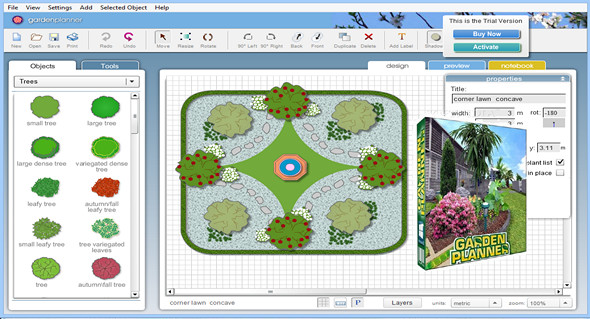
Garden Planner is an easy-to-use application designed for garden and landscape design. With the program's help, you can easily create your own dream garden. It features a built-in library of over 1200 plants and objects, each customizable to your liking. User-friendly drawing tools are available, allowing you to create walkways, various types of flooring, paths, walls, fences, swimming pools, ponds, and more.
The application is very easy to use: All actions are performed using drag and drop. Simply select the desired object from the sidebar and paste it anywhere in the drawing. There is a huge database containing various elements and objects, including trees, flowers, bushes, fences, garden sheds, pavilions, buildings, and sidewalks.
Each graphic element can be freely rotated, duplicated, zoomed, and reactivated, and its shape can be changed. Tools are available for inserting various types of descriptions, high-quality printing, and a screen for previewing the finished project.
Furthermore, the application allows you to export a project to an image file (JPEG, PNG), create a report containing a list of all printable objects, or save it in CSV or TXT format. In addition, the program allows you to create your own library of finished items.
Features:
– Very easy-to-use interface
– Save and upload your own designs
– Use a wide range of generic plant forms to design your garden, so you don't need to be a botanist to use it
– Produce a professional printout of your plan
– Use tools to quickly create paving stones, fences, and paths
– Generate a report of all the plants and objects in your garden
– Create a custom plant library
Configuration:
– Windows (x32/x64 Bits): XP, Vista, 7, 8, 8.1, 10
– Processor: 1 GHz
– RAM: 512 MB
– Disk space: 1 GB
Portable version:
Run the file Garden Planner_portable.exe
Language Multilingual (including French)
Size : 20.6 MB
This article was updated on July 16, 2017