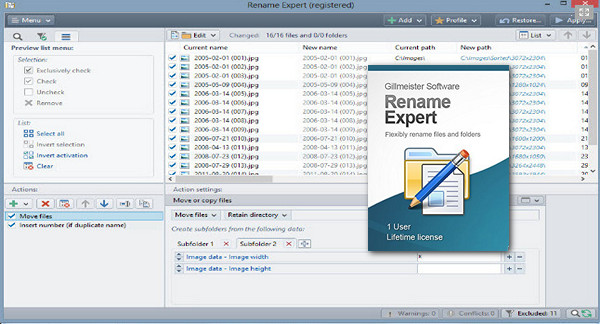
Rename Expert is a versatile and powerful tool for editing folder and file names. The program allows you to rename thousands of files in record time. With just a few clicks, file names can be easily adjusted. Thanks to its clear user interface, the learning curve is very short.
You also have the option to edit your files that contain metadata, such as Exif information for your photos. This allows you to re-sort and reorganize them.
Note that Rename Expert supports batch processing of your documents. Finally, you can undo and restore your files at any time.
Main features:
Rename file folders
Rename folders, subfolders, and files simultaneously
– Allows batch renaming of an unlimited number of files and folders at once (including network media).
Filtered
Filtering and sorting functions
– Extended filtering and sorting functions can also be used for metadata, allowing the inclusion and exclusion of files and folders.
CSV files
Use CSV files to name
– CSV files, for example exported from Excel, can be used flexibly to name files and folders. The old and new names can be composed of multiple columns.
Move files
Move and rename files in one step
– In addition to renaming, files can also be moved or copied into subfolders whose naming is based on metadata (e.g., date taken, date created, etc.).
Special functions
numerous special functions
– Rename Expert offers a variety of specialized functions, such as adding the checksum (MD5, SHA, CRC32) of the file content to the file name, encrypting file and folder names, or the ability to add random names to file names, like renaming completely random files.
Preview of new file names
Real-time preview of new filenames
– All changes are displayed in real time and are checked for errors (e.g., a duplicate name) to avoid potential conflicts.
Use of metadata
Renaming files using extensive metadata
– Metadata (EXIF, IPTC, ID3, etc.) can be used to name files (for example, for images and audio files).
Numbering files
Folder and file numbering
– Files and folders can be numbered sequentially or in a random order. Existing numbering can be easily overwritten or adjusted.
File contents
Automatically create filenames from the file's contents
– With Rename Expert, you can automatically generate filenames from the content of document files (e.g., XML, HTML or log files).
Rename file extensions
Rename file extensions
– With Rename Expert, file extensions can be changed arbitrarily (for example, jpeg to jpg). They can be added or removed, and their case is individually customizable.
Too long a path
Shorten long filenames / Modify file paths longer than 260 characters
– With Rename Expert, you can rename files or folders that exceed a path length of 260 characters and therefore can no longer be modified using Windows Explorer.
Usage profiles
Save the settings to the rename as profile
– Action lists allow you to combine a different number of actions and can be saved as a profile for future reuse.
Configuration:
– Windows (x32/x64 Bits): XP, Vista, 7, 8, 8.1, 10
– Processor: Pentium 4 3GHz
– RAM: 512 MB
– Disk space: 30 MB
Facility :
It's a portable version
– Run the file RenameExpertPortable.exe
- Language : English / German
- Size : 16.1 MB


This article was updated on June 16, 2021