Glary Utilities Pro is a one-stop-shop system optimizer that offers many functions; it is powerful and easy to use, notably having tools to repair registry errors, clean the computer, and it also allows you to speed up and improve system performance.
Glary Utilities Pro is an "all-in-one" system optimizer that provides registry cleaning, disk cleaning, memory optimization, startup optimization, track erasure, file restoration, file encryption, and many other handy tools.
Its remarkable registry tool is the safest and most efficient on the market for cleaning and fixing registry errors. It quickly performs disk cleanup to free up space by removing invalid registry entries, temporary files, and internet traces. Glary Utilities Pro can easily remove your add-ons to speed up your internet connection, analyze disk space usage, and find duplicate files for better file management.
Its uninstallation and startup manager program allows you to intuitively view installed programs and running processes.
File encryption is also supported by this system utility and it can protect your files from unauthorized access.
To improve work efficiency, Glary Utilities Pro can split large files into smaller, manageable parts and then rejoin them, making it easy to transfer large files via email or online communication tools.
In addition, Glary Utilities Pro includes options to manage applications that start automatically when Windows starts and to completely uninstall software without leaving any traces and cluttering your system.
Other features include File Shredder, which makes deleted files unrecoverable by a malicious person or virus.
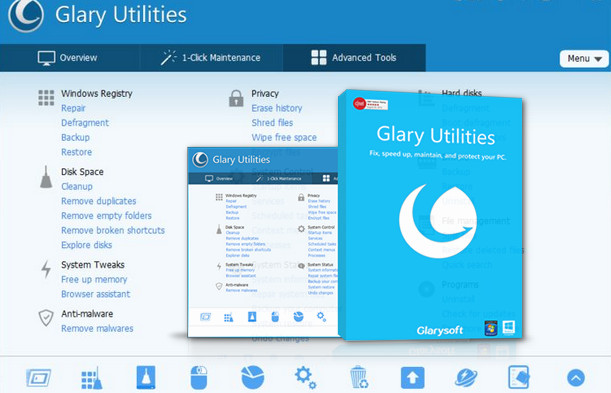
All Glary Utilities Pro tools are accessible through an interface that is pleasing to the eye and completely simplistic.
The following is a brief introduction to the main functions of this one-stop-shop system optimizer:
Automatic programming at a user-defined time
Glary Utilities Pro allows the user to define a time range to automatically start their work.
You can configure it to run scheduled maintenance and optimization when the PC is in sleep mode, or at the most appropriate time, daily, weekly or monthly.
It will automatically scan your computer and repair any problems immediately or after your approval.
One-click maintenance
Glary Utilities Pro offers all-in-one automated maintenance with a single click, including quick and thorough scanning for invalid registry keys, unusable shortcuts, unnecessary startup items, temporary files, internet history, and spyware.
Then, a second click to "perform repairs" and you can greatly accelerate system performance. With just one click, it's easy to optimize the system immediately without going through multiple steps.
Cleaning and Repair Module
Disk Cleaner – Removes unwanted data from your disks and recovers disk space.
Registry Cleaner – Scans and cleans your registry to improve your system's performance.
Shortcut Fixer – Corrects errors in your Start Menu and desktop shortcuts.
Uninstall Manager – Allows you to completely uninstall programs that you no longer need.
Optimize and improve module
Startup Manager – Manages programs that run automatically at startup.
Memory Optimizer – controls and optimizes free memory in the background.
Context menu manager – Manages context menu entries for files, folders…
Registry Defrag – Defragment the Windows registry to speed up your computer.
Privacy and Security Module
Tracks Eraser – Erases all traces, evidence, cookies, internet history and more.
File Shredder – Permanently erases files so that no one can recover them.
Undelete File – A quick and efficient way to recover accidentally deleted files
File Encrypter and Decrypter – Protects your files against unauthorized access and use.
Files & Folders Module
Disk Analysis – Displays the disk space usage of your files and folders.
Duplicate Files Finder - Searches for duplicate files
Empty Finder Folders – Finds and deletes empty folders in your Windows.
File Splitter and Joiner – Splits large files into several smaller, more manageable files, and then regroups them.
System Tools Module
Process Manager – Identifies programs running on your computer and stops spyware and Trojans.
Internet Explorer Assistant – Manages Internet Explorer Add-ons and restores hijacked settings.
Information system – Collection of information about your hardware and software.
Standard Windows tools – Provides direct access to useful default Windows functions.
Configuration:
Windows: 10/8/7/2000/XP/Vista/32/64bit Version
CPU: Intel or AMD with 133MHz
RAM: 1GB
HDD: 20MB of space
Facility:
1. Open the torrent folder and click on the "gup5setup.exe" file to install the program. At the end, remember to uncheck "Install Malware Hunter".
2. You must set it to French (unless Upgraded), to do this click on the "Menu" button and settings", a window will open, scroll down the Language option in the form of an "elevator" and click on "Franτais(Fr)" and confirm.
3. Open the "Keygen" folder, choose your keygen,
4. In both cases, enter your name and click "generate".
5. Then copy/paste the result
–> in the registration fields obtained by clicking on "FREE" at the bottom right of the main window in any of the "Presentation", "1-Click Maintenance" or "Advanced Tools" tabs
6. Registered Product
- Language: French / Multilingual
- Size: 43.24 MB
This article was updated on August 27, 2016