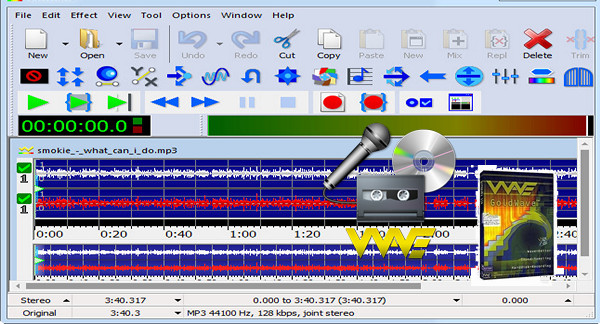
GoldWave is a professional digital audio editor. Use it to play, edit, mix, and analyze audio, or apply special effects such as fade, equalizer, echo, inversion, time warp, noise reduction, silence reduction, pop/click filter, voice-over, etc.
Record new files from cassettes, albums, radio or microphone and restore and enhance using the wide range of filters and effects.
To enhance or modify the sound, a dozen effects are available. These include an equalizer, reverb, a flanger, and much more. It also features noise reduction for vinyl and cassette recordings. Frequency analysis tools are also included.
Gold Wave supports wav, mp3, ogg, aiff, au, vox, mat, snd, voc, raw and several other formats up to 4GB, between which you can perform conversions at will.
Furthermore, if you make a mistake while editing an audio file, you can restore the file and return to the initial point.
GoldWave Features
– A large and powerful application developed to help people process different types of audio files.
– Allows you to apply different audio effects, then play them back to ensure the final result is impressive.
– Equipped with a user-friendly interface.
– You have a full menu bar and a pane in which to display the waveform of the downloaded item.
– You have a control window included in this utility that will allow you to view real-time visuals and audio device controls.
– Can display sound during playback or recording.
– The Effects menu will give you quick access to controls such as censorship, Doppler, dynamics, echo, compressor, filter and flanger, etc.
– GoldWave portable version
Version : 6.47
Language : Multilingual (French included)
Size : 20.60 MB
Configuration:
– Windows (x32/x64 Bits): XP, Vista, 7, 8, 8.1, 10
– Processor: 1 GHz
– RAM: 1 GB
GoldWave 6.47 + Portable
This article was updated on March 3, 2020