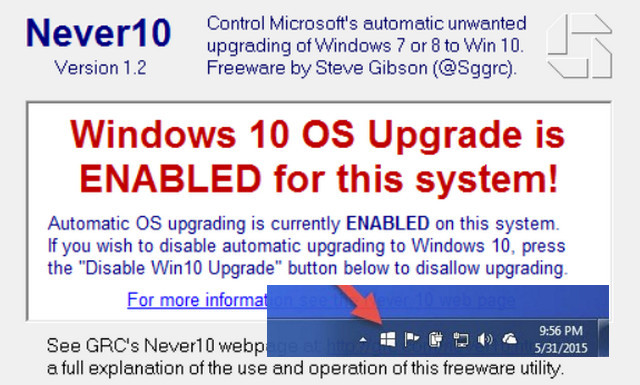
Never10 is an easy-to-use utility that allows users to control whether their Windows 7 or 8.1 will upgrade to Windows 10.
The name "Never10" is a bit of an exaggeration, since this utility can also be used to easily re-enable automatic Windows operating system upgrades. However, its primary purpose is to disable the incessant notifications about upgrading from Windows 7 or 8.1 to Windows 10.
Many Windows 7 and 8.1 users are happy with their current version of Windows and don't want to upgrade to Windows 10. There are many reasons for this, but among them is the fact that Windows 10 became controversial due to Microsoft's integration of a service into their Windows operating system platform. This service, among other things, was designed to monitor and report on user activity. This fact alone made many users uneasy, leading them to choose to wait. Subsequently, in early 2016, unsolicited Windows 10 advertisements began appearing on users' computers. Others dislike the changes Microsoft made when merging the smartphone user interface tiles with the Modern UI. And finally, others oppose Microsoft's imposition of these changes and simply want to choose for themselves.
In July 2015, in response to significant user feedback, Microsoft added features to its Windows Update website that allow users to modify the configuration, machine by machine, to opt out of upgrading from Windows 7 and 8.1 to Windows 10. However, Microsoft did not make this configuration straightforward. It requires using the Group Policy Editor (which is not available in some systems) and/or the system registry. In other words, they created some deep internal configuration options but chose not to provide a simple user interface to give their users the choice. "Never10" offers this choice.
The elegance of this "Never10" utility lies in the fact that it doesn't install any proprietary software. It quickly and easily performs the system edits required by the user.
If the system being configured has a version of Windows Update older than the one updated in July 2015, it means that the options necessary for the "disable upgrade" are not yet present. This utility will then prompt the user to download and install the necessary Windows Update so that Windows can be configured not to upgrade to Windows 10.
This utility simply updates and/or configures the system to prevent or allow operating system upgrades; it can be removed after the system has been configured correctly.
Thanks to this utility, inexperienced users will be able to easily use Never10 themselves, while advanced users will undoubtedly appreciate the fact that no additional software is installed and will be able to introduce this easy-to-use utility to their friends and family.
Configuration
System: Windows 7, 8.1
Processor: x86, x64
Memory: 1 GB
Hard drive: 1 MB available
- Language: English
- Size: 86.59 KB
This article was updated on July 22, 2016