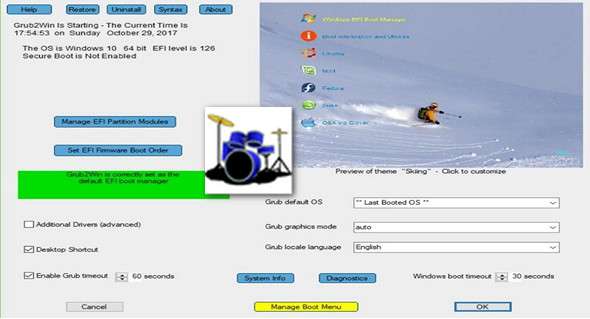
Grub2Win provides you with a boot manager that allows you to boot from different operating systems each time you turn on your computer.
First, boot managers solve a problem that many users encounter when they want to install different operating systems on their PC. For example, you might want to have Windows, several Linux distributions, and even Mac OS X deployed on the same system. Without a boot manager, the boot sequence will choose the same operating system again and boot.
You don't need to install it over the one you've already launched, and then reinstall the old one if you see no reason to keep the new one. Besides this, there are several other reasons to use boot managers and, by extension, multiple operating systems. One of these relates to application development and testing.
Overall, Grub2Win is a pretty neat application that silently resides in your system's first primary partition, takes up little space, and also includes several themes for you to choose from. This way, you ensure that you don't interfere with the Windows MBR code and that your partitions don't get mixed up and cause headaches.
Features
– Supports 64-bit and 32-bit EFI as well as BIOS firmware
– Installs on Windows 10, 8, 7, Vista and XP
– Requires only one directory on the Windows C: drive, approximately 15 MB of disk space
– A simple Windows graphical interface allows you to configure Grub2Win in seconds
– Allows you to define your EFI firmware boot command from Windows
– Preview and select themes and startup animations during installation
– Grub startup messages and help can be displayed in 27 major languages worldwide
– Works with all file systems, including Mac hfs and Btrfs
– Can search for and start a partition by its label. Supports advanced scripting.
– Works with MBR and GPT disks – up to 128 primary partitions per drive
– Supports extremely large disks and partitions (over 4 TB)
– No change of register
– Securely multiboot Windows, Remix, Android, Ubuntu, Debian, SUSE, Fedora, Mint and more
– Grub customization is performed from Windows – configuration under Linux is not required
– Runs the open-source GNU Grub 2.02 code. Frequent releases and improvements
– No adware or spyware – no worries… It works.
What's new:
– Fixed a minor error in the display of the startup menu selection.
– Minor improvements to the graphical interface.
Configuration:
– Windows (x32/x64 Bits): XP, Vista, 7, 8, 8.1, 10
– Processor: 1 GHz
– RAM: 1 GB
– Disk space: 10 MB
Language Multilingual
Size 5.5 MB
This article was updated on January 10, 2018