The hosts file is used by Microsoft Windows and other network operating systems as an optional means to redirect TCP/IP traffic under special circumstances.
This file is not required to use ordinary network and Internet applications. The hosts file is designed to be edited by a computer administrator, an advanced user, or an automated scripting program.
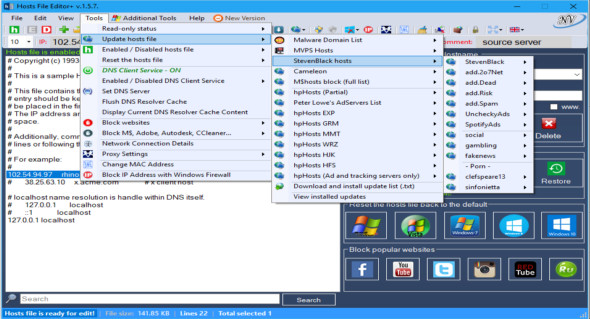
Hosts File Editor allows you to easily modify the hosts file without any difficulty: it displays all the changes made, saves each step, retrieves the original file and allows you to disable any IP address, all with a single click.
The functions of this program:
– Add a new host (IP address and hostname)
– Delete the host
– Save changes
– Change the state to read-only (hosts file)
– Backing up the hosts file
– Restore the hosts file from a backup
– Create a new hosts file (If the hosts file does not exist – C:/Windows/System32/drivers/etc/)
– Import a file (.txt)
– Export the hosts file
– Add a blank line
– Add a comment (#)
– Properties (hosts file)
– Search for articles
– Replace IP (127.0.0.1 — -> 0.0.0.0; 0.0.0.0 —> 127.0.0.1 and custom)
– Edit the selected comment (#) – (to allow double-clicking on the item…)
– Remove duplicate items
– Selected comment
– Delete the empty lines
– Delete the comment lines
– Hosts file enabled/disabled
– DNS customer service enabled/disabled
– Block popular websites (Facebook, YouTube, Twitter…)
– Block Microsoft, Telemetry, Adobe…
– Reset the hosts file to default settings (Windows XP, Windows Vista, Windows 7, Windows 8, 8.1, Windows 10, Windows Server 2003, Windows Server 2008, Windows Server 2012)
– Download and install the update list (.txt)
– Update the hosts file (install the update and uninstall the update)
Configuration:
– Windows (x32/x64 Bits): XP, Vista, 7, 8, 8.1, 10
– Processor: 1 GHz
– RAM: 1 GB
Language Multilingual (French not included)
Size : 5.4 MB
This article was updated on May 1, 2018