You've probably played a game with catchy music and regretted not being able to listen to it on your MP3 player.
You will need:
- The DownloadHelper Firefox extension [here]
- Firefox Adblock Plus extension [here]
- The SWF Extractor software [here]
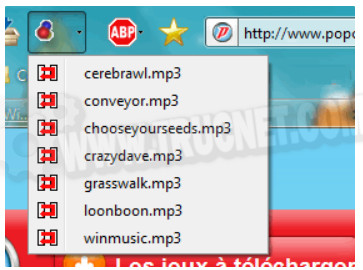
First, go to the page where the game is located. If you're lucky, the music you want won't be included in the game. Yes, you're lucky, because the DownloadHelper extension can immediately detect the external files requested by the game.
You can then download them like this:
Second case The DownloadHelper icon remains empty. This means the music is located INSIDE the Flash animation. You will need to download it.
To do this, click on the "Block" tab, which will open Adblock Plus:
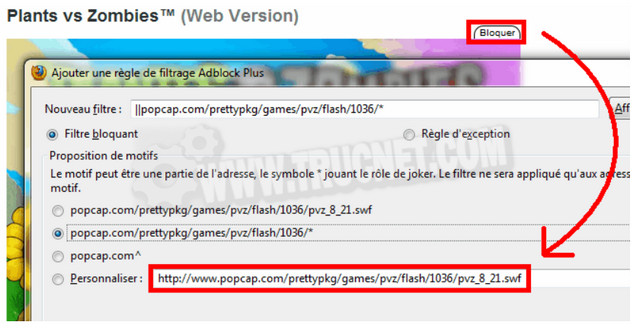
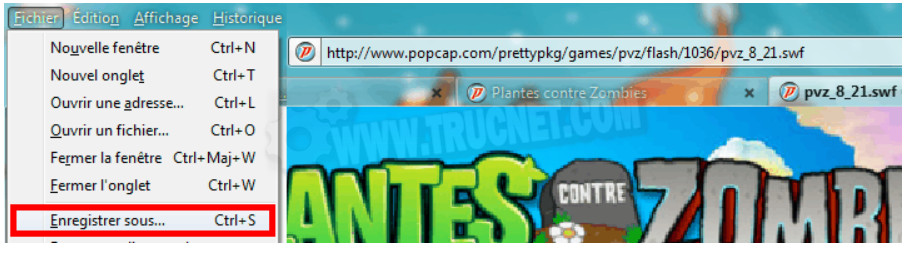
You will then obtain the address of the SWF file. This file is the game. Copy and paste this address into your browser's address bar; the game should then display in full screen. All that remains is to download the SWF file using the option. Save As in the File menu:
Now that you have the SWF file, all you have to do is extract it.
Open SWF Extractor. Click on Open and select the SWF file.
The various sounds and images contained in the SWF file appear before your astonished eyes:
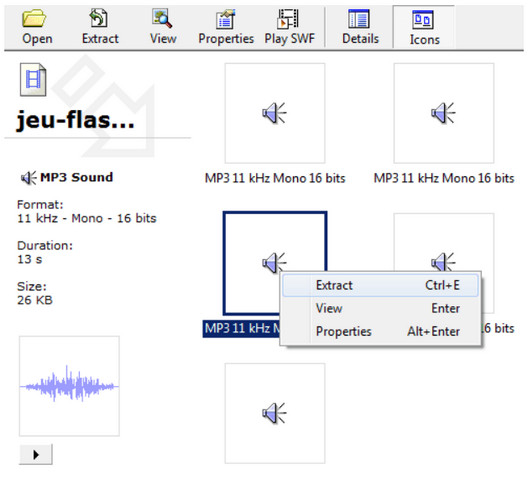
Listen to the sounds to identify the one you want, then select Extract. Now all you have to do is choose where to save the file. It took a little while, but there you have it—your much-desired sound file!
This article was updated on March 3, 2016