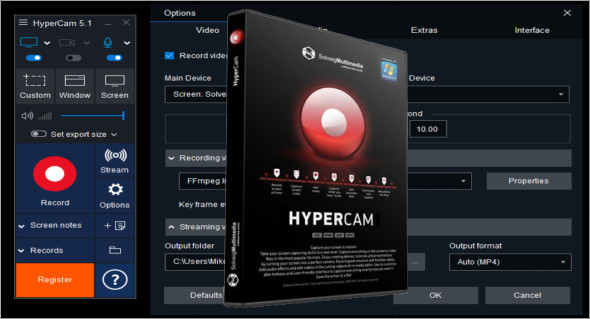
HyperCam is a powerful software designed to record everything that happens on your computer screen, including sound. It is widely used for capturing video tutorials, software demonstrations, presentations, and even gameplay.
Thanks to its intuitive interface and numerous features, HyperCam lets you record high-quality videos with excellent audio. Whether you're a content creator, teacher, professional, or gamer, this software offers a simple and effective solution for capturing your screen in real time. You can also download TechSmith Camtasia.
Why choose HyperCam?
HyperCam stands out for its ease of use, advanced options, and lightweight design, guaranteeing a smooth experience without impacting your PC's performance. With it, you can:
- Capture high-quality videos with audio support
- Record interactive tutorials for training sessions or demonstrations
- Create seamless screencasts with optimized recording
- Capture real-time gameplay without noticeable slowdown
- Export videos in multiple formats for easy sharing
Thanks to these advantages, HyperCam is the ideal tool for anyone looking to record and share screen videos with professional quality.
Key features of HyperCam
1. Video screen capture with embedded audio
HyperCam lets you record your screen activity with or without sound, depending on your needs. You can choose to include:
- System sound (music, sound effects, notifications)
- Your voice via a microphone to comment on your videos in real time
- External audio for interactive presentations
This feature is ideal for tutorials, online training, and software demonstrations requiring live narration.
2. Smooth, lossless recording
HyperCam offers smooth video capture without lag or slowdown, even for long recordings. It supports multiple output formats such as AVI, MP4, WMV, and many more, ensuring compatibility with most media players and streaming platforms.
Thanks to its optimized encoding engine, HyperCam allows you to capture videos with an efficient compression rate, reducing file size while maintaining excellent visual quality.
3. Built-in editing and annotation tools
Once recording is complete, HyperCam offers tools to quickly edit your videos without needing third-party software. You will be able to:
- Cut, merge and adjust parts of your video
- Add annotations and text for better understanding
- Optimize audio and image for a professional result
These features make HyperCam an all-in-one software, suitable for both beginners and professionals.
4. Gameplay capture and live streaming
HyperCam is also an excellent choice for gamers who want to record their gameplay without lag. It allows you to:
- Capture gameplay footage in high resolution
- Save without slowing down PC performance
- Easily share videos on YouTube, Twitch, or other platforms
Its compatibility with full-screen or windowed mode games makes it an ideal solution for streamers and gaming video creators.
5. Intuitive interface and customization options
HyperCam offers a clear and easy-to-use interface, allowing you to:
- Select the capture area (entire screen, specific window, defined area)
- Define keyboard shortcuts to start, pause, and stop recording
- Adjust video compression settings to optimize file quality and size
This flexibility allows HyperCam to be adapted to all types of needs and uses.
Why is HyperCam an essential piece of software?
Compared to other video capture software, HyperCam offers an excellent balance between simplicity, performance, and advanced features. It is particularly well-suited for:
- Trainers and teachers who create online courses
- Professionals who create software demonstrations
- Gamers and streamers who want to record their gameplay smoothly
- Companies that create interactive presentations
Its efficiency and lightweight design make it an ideal tool for anyone wishing to capture screen videos with a professional look.
In conclusion, whether you need to create tutorials, record demonstrations, capture gameplay, or deliver presentations, HyperCam is the perfect software to meet your needs.
With its advanced features, ease of use and smooth recording, it allows you to create high-quality video content effortlessly.
Version : 6.2.2503.14 Business Edition
Language : Multilingual (French not included)
Size : 94.34 MB
Configuration:
– Windows (x64 Bits): 10, 11
Download HyperCam Business Edition v6.2.2503.14
This article was updated on March 22, 2025