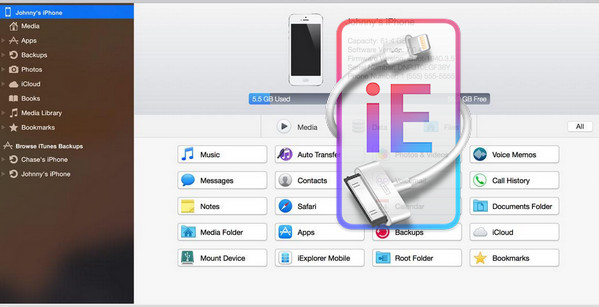
iExplorer (formerly known as iPhone Explorer) is the ultimate iPhone, iPad and iPod manager, allowing you to use an iPhone or iPad in disk mode, like a flash drive.
Compatible with all iPhones and iPod Touches including the new iPhone 7 and iOS 10 firmware.
iExplorer is an iPhone browser or iPad file explorer that works on Mac and PC that lets you browse files and folders on your iPhone as if it were a USB flash drive or a normal pen reader.
You can use the easy drag-and-drop methods to add or remove files and folders from the iPhone.
iExplorer hacks in your iPhone so you don't have to break it.
We have figured out ways to control the iPhone even better than iTunes, and the best part is, all you have to do is plug your iPhone, iTouch or iPad into the computer.
Features :
Intelligently transfer music to iTunes
iExplorer lets you easily transfer music from any iPhone, iPod, or iPad to a Mac or PC and iTunes. You can search for and preview specific songs.
Next, copy them to iTunes with the touch of a button or by dragging and dropping. With a single click, iExplorer lets you instantly rebuild playlists. Or use the automatic transfer feature and copy everything from your device to iTunes.
Export iPhone text messages, SMS, iMessages, text messages
iExplorer lets you browse, preview, save, and export the most important information in your iPhone or iPad databases. View your appointments, calendar events, and call history. Listen to voicemails from your iPhone and export them to a folder on your computer.
Everything is always just a few mouse clicks away. Taking charge of your content.
Mount iPhone and iPad to Finder and Windows Explorer on Mac
The disk mounting feature in iExplorer lets you use your iPhone, iPod, or iPad as a USB flash drive. You can view photos from your iPhone directly in Finder or Windows Explorer, just like you would with any other digital camera.
You can also access the file system for data contained in apps or other directories on your device. iExplorer can back up or move your high-score games from one device to another. It also lets you save files directly to or from your preferred file manager, such as the iOS app iExplorer or the mobile app iExplorer.
Export voicemails, address book, contacts, event calendar, reminders, notes…
With iExplorer, you can easily save all or part of your text messages.
It lets you remember special moments, preserve important data, and do more across all your devices with simple iPhone SMS backup. The app's beautiful, intuitive interface makes it easy to search and save iPhone text messages. Plus, you can view and save your voicemails, or export them to your Mac or PC.
Access to Photos, Files and Others
With iExplorer, you can access other files and folders without jailbreaking.
your device like never before. You can also access photos on your iPhone or iPod.
You can also access the files and folders of the applications on your device.
iExplorer also works very well if your iPhone is jailbroken. With AFC2 access,
The application can read and write to the true root of the iOS device.
Now iOS 10 and iPhone 7 Ready (and still supports all iPhones, iPads and iPods)
Requires iTunes 10 or later.
Configuration:
– Windows (32-bit & 64-bit): XP, Vista, 2003, 7, 8, 8.1, 10
– P4 3GHz processor
– 1 GB of RAM available
– 150 MB of free disk space
– Requires iTunes 10 or later
Facility:
1. Install iExplorer on your PC
2- Launch the Keygen.
- Language: French
- Size: 11.85 MB
This article was updated on September 19, 2016