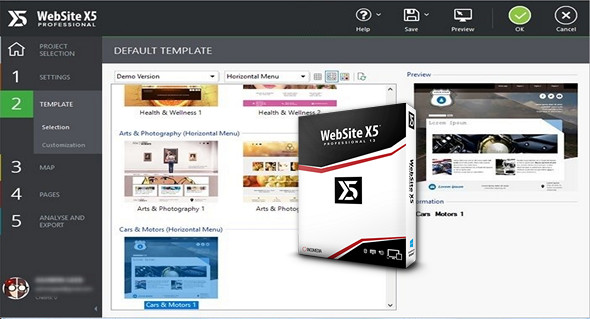
WebSite X5 is the most comprehensive software for creating attractive and functional websites, blogs, and online stores that display perfectly on desktops, tablets, and smartphones. No programming skills are required.
It's easy to use, with many great features so you can create websites that automatically adapt to all screen sizes. Create responsive, search engine optimized websites, blogs, and e-commerce sites that also include an app.
MAIN FEATURES
MOBILE WEBSITES
Create responsive websites that adapt perfectly to all devices. You decide what changes during the transition from desktop to smartphone: regardless of the device used by the visitor, the browsing experience will be the best.
THE MOBILE DEVICE FOR YOUR WEBSITES
This application offers a valuable service: a website that displays and functions correctly on a mobile device, complete with a dedicated app. The FeedReady app is ready and free for iOS and Android: connect it to your blog or RSS feed and invite your visitors to download it so they can receive all your updates on their tablets and smartphones and stay informed.
E-COMMERCE
Import your product list and create your catalog, configuring all descriptions, costs, variants, photos, availability, and more. You have all the tools you need to showcase your products in the best possible light, set up your sales process and special offers using coupons if desired, and keep a close eye on your inventory.
UPDATING YOUR WEBSITES ONLINE
Use the dynamic content feature so others can update it, just like with a CMS, by working directly online. You maintain complete control over the project, with the added benefit that clients don't have to rely on you for minor changes.
ACCESS MANAGEMENT
Allow users to register online for member areas so that, once they have verified their email address, they can access areas requiring a login and password. You can store the data in a database and manage registration via the online Control Panel.
SEO OPTIMIZATION AND ANALYSIS
Use the available options to improve the optimization of website pages and content: images, videos, products, etc. Before going live, use the project analysis features to further optimize the site.
Configuration:
– Windows (x32/x64 Bits): XP, Vista, 7, 8, 8.1, 10
– Processor: 1 GHz
– RAM: 512 MB
– Disk space: 300 MB
Facility :
1- Turn off your internet connection during installation.
2- Execute the wsx5_pro.exe.
3- Follow the installation procedure.
4- An activation window opens at the end of the installation…
5- License activation: Launch the Keygen kg.exe.
6- Choose from Edition the version of your software to activate (Professional V13x).
7- Choose from Language your language.
8- In E-mailChoose an email address of your choice / click button Generate
9- Copy your license key into the activation window (License Key).
10- Copy your e-mail previously entered into the keygen.
* The activation software will tell you that online activation is not working.
11- Click on following to take you to the manual activation window.
12- Enter your unlock code (Unlock Code) of the Keygen.
Language Multilingual (including French)
Size : 170.4 MB
This article was updated on April 21, 2017