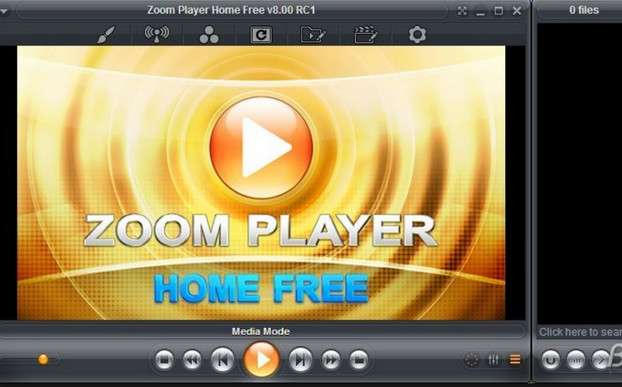
Zoom Player is the most powerful, flexible, and customizable media player for the Windows PC platform.
Using Smart Play technology, more video, audio and image formats are recognized more easily, with increased stability and better performance.
Building a Home Cinema PC
Zoom Player's central media navigation interface is based on a simple 5-key design (up/down/left/right/select) tailored to each user. The Zoom Player media center provides easy navigation to interfaces such as the media library, folder browser, playlists, color control, audio equalizer, markers, playback history, and more.
With Zoom Player, you can instantly convert any PC into a Media Center or Home Cinema (HTPC) without any additional hardware or operating system requirements (Zoom Player works on any version of Windows).
Using Zoom Player's customizable and flexible design, you can easily create a safe viewing environment for the family, while at the same time providing experienced users with all the settings and configuration at their fingertips.
The Install Center
The Zoom Player Installation Center scans your system to find outdated or existing components, and provides a list of digitally signed and verified recommended updates and fixes to install.
With the Install Center, you can be assured that your system is up to date with the latest components without compromising security.
Video on how to use the Install Center: Click here
The Zoom Player Install Center eliminates the need to search for and install updates.
Smart Play Technology
Zoom Player installs easily, learning your computer hardware and software using Smart Play technology. Zoom Player uses the ideal "playback profile" for each media format. The profile includes the most suitable audio and video decoders – a combination that guarantees a perfect viewing experience, every time.
A professional tool
– Zoom Player is extremely customizable.
– Each function is accessible via the keyboard and can be controlled remotely.
– Each keyboard macro is reprogrammable.
– Context menus are scriptable.
– The interface is skinnable and scriptable.
– Every mouse button and scroll wheel can be assigned to a customizable function.
– Any audio and video codec can be replaced by a multitude of suitable alternatives.
– Each audio device is supported as an output device
– The latest visual rendering technologies are incorporated.
– And to top it all off, Zoom Player can be ordered externally via our WinAPI, COM and TCP/IP based SDKs.
Features
– Decrypts Blu-ray playback with subtitle support.
– Video Wall (Span a single video across multiple screens).
– Scene-Cut (Dynamic Virtual Audio / video editing).
– Playback of non-linear, 16:9 (widescreen), 4:3 (fullscreen), original source, ana-morphing and custom formats.
– ScalingGuardDog (automatically restart Zoom Player if the player stops responding).
– Highly configurable application, thanks to its modular design and various options.
– Precise control of the reading and viewing of multimedia files.
– Editing of episodes and scenes.
– Built-in equalizer, with more than twenty pre-configured settings.
– Convenient access to favorite content.
– Compact mode for audio playback.
– DRM support.
Supported video formats:
DVD – BluRay (Decrypted Main Movie playback) – Matroska (MKV) – H.264 & AVCHD (MPEG4 AVC) – H.265 & HEVC
MPEG2 Transport (TS/TP/TSP/TRP/M2T/M2TS/MTS/PVA/PVR/TOD) – XVID – DIVX – AVI – Flash Video (FLV)
Windows Media (WMV/ASF) – QuickTime (MOV/HDMOV) – WebM – Ogg Movie (OGM) – Theora (OGV)
Real Media (RM/RMVB) – VideoCD (VCD) – Super VideoCD (SVCD) – MPEG (MPG) – MPEG2 Program (M2V/VOB/MOD)
MPEG4 (SP/ASP) – MPEG4 ISO (MP4) – , General Exchange Format (GXF) – Material Exchange Format (MXF)
Media Center DVR (DVR-MS) – CamCorder (MOD/TOD) – Digital Video (DV) – DVCPRO – VP3 – VP6 – VP7 – VP8 – VP9
Motion JPEG (MJPEG) – Motion JPEG 2000 (MJPEG2000) – Flash (SWF) – Cellphone 3GPP (3GP/3G2) – FLIC (FLI/FLC)
Supported audio formats:
MP3 – Free Lossless Audio CODEC (FLAC) – OPUS (OPUS) – Advanced Audio Coding (AAC) – Windows Media (WMA)
OGG Vorbis (OGG) – CD-Audio (CDA) – Cell Phone (AMR) – Matroska (MKA) – Wave Audio (WAV) – SHOUTcast (Streaming)
Dolby Digital (AC3) – Digital Theater Surround (DTS) – Monkey Audio (APE) – Real Media (RA) – MusePack (MPC)
WavPack (WV) – OptimFROG (OFR) – Shorten (SHN) – True Audio (TTA) – LPCM – MIDI – Apple Lossless Audio Coding (ALAC)
AIFF – MO3 – IT – XM – S3M – MTM – UMX
Supported interactive formats:
DVD – Hypertext Markup Language (HTML) – Flash (SWF)
Supported image formats:
JPEG (JPG) – PNG – GIF – BMP – PSD – TIFF – ICO – TGA – PSD – FAX – WMF – EMF – JFIF – RLE – WIN – VST – VDA – ICB
PCC – SCR – RPF – RLA – SGI – BW – EPS – PCX – PDD – PPM – PGM – PBM – CEL – PIC – PCD – CUT – PSP – PN
Configuration
– Supported operating systems: Windows XP/Vista/Seven/8/8.1/10 (32-64 bits)
– PC INTEL/AMD (32-64 bits)
– RAM: 1GB
– Disk: 100 MB
Facility
1 – Launch “zp1100max.exe” (see “installation options.jpg”)
a- Personally, before starting the installation, I unchecked 2 boxes
(see image "Installation Choice.jpg")
Once finished, do not launch the application.
2 – Next, install “zp_french861.exe” for French support
3 – Open the “Crack” folder, then copy the “zplayer.exe” file
and paste it into the folder C:\Program files (x86)\Zoom Player.
Confirm the replacement of the existing file.
4 – Next, launch “zplayer.regkey” (which launches the application).
a- Select the type of hardware on which you are installing the software
(PC, tablet, etc.)
b- Click on "OK" on the info window that follows (request to restart the software)
5 – One last little adjustment to ensure peace of mind:
Disable software updates.
a- Launch Zoom Player
b- Right-click on the player screen > “Options/Configuration”,
c- Click on "Switch to advanced mode" (bottom left),
d- Click on "System",
e- Uncheck "Automatically check for updates"
f- Click on "Apply" then "OK"
- Language: French / English
- Size: 49.54 MB
This article was updated on July 21, 2016