InPixio Photo Clip 7.06 Professional is photo editing software that allows you to easily cut out elements from a photo to remove them, place them on a different background, or create photo montages. The application can easily detect solid or uniform backgrounds so it can cut out the main element using digital scissors. Unwanted objects or imperfections can be quickly removed.
Allowing you to create impressive photo montages! The interactive assistant and tutorials will guide you in improving all your photos!
Simply cutting and creating
– Remove distracting details and correct errors
– Impeccable cropping of your photos and images
– Create incredible photo montages
– NEW! New interface
– NEW! New backgrounds available for photo editing
– NEW! The "Share" button for Facebook, Twitter, Flickr, InstaCards
– IMPROVED! Improved algorithm for cutting – removing – assembling
Remove unwanted objects or people with Eraser
The Erase function lets you remove any object or person from your image while preserving its full quality. The selection tool includes automatic color detection to help you retouch your photo. InPixio Photo Clip 7.06 simply removes selected areas and/or restores the background. Correct any imperfections with the Clone Stamp tool.
Examples of uses:
– Remove traffic lights, signs or wires
– Remove shadows
– Remove text, data, logos and watermarks
Enhance your photo in just a few clicks!
– IMPROVED! Reduces the appearance of wrinkles and lightens minor imperfections.
– Use the Eraser function to retouch portraits as well. Erase minor imperfections and reduce the appearance of wrinkles – just like glossy magazines!
IMPROVED! Repair old photos.
Use the Erase function to remove scratches, smudges, and other imperfections from old photos (that have already been scanned). It's the perfect way to keep your old family photos safe and sound!
InPixio Photo Clip 7.06 will be very useful for improving your old photos:
– After scanning your photos, restore them with InPixio Photo Clip!
– Describe the damaged areas of your photos. Adjust the slider size, and you'll get perfect results even on the smallest scratches.
– Simply click on “Erase” to begin restoring your photo. All scratches, stains, and other imperfections have been removed.
IMPROVED! Cloning Tool
Use the Clone tool to refine your edit or to clone contrasting elements. Existing objects can be redrawn on screen with the clone stamp. Repeat this process as often as you like to create striking twin effects!
Cut in just a few clicks
With InPixio Photo Clip 7.06, your digital scissors, let you cut out any detail, person, object, or landscape from your photos. Select the shape of the object or the background to remove using the cursor, and the Photo Clip algorithm will run automatically!
You can also use the "retention" slider to preserve important details and achieve a perfect cut! Even fine details like hair can be removed with incredible precision. Then, simply paste the cut objects onto any background to create collages or photo montages—all in one click! Only in the professional version: create greeting cards, invitations, flyers, and more by adding text, frames, and effects!
NEW! Smoothed edges
This enhanced function allows you to intelligently smooth the edges for a smoother transition between the subject and the background, for even more successful integration into your photo montage.
NEW! New horizons available!
Select a background from the available original images, or upload your own background image for unique photo montages!
Easy to use
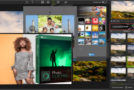
InPixio Photo Clip 7.06 helps you enhance your photos. Each module has been designed for ease of use while still delivering professional results. Automatic detection algorithms guide you through the editing process.
Only in the pro version:
NEW! Text editor
Add text to your images and create personalized, image-based ads for your family and friends.
IMPROVED! +100 Original Filters
Add unique filters and effects to your photos: a multitude of themes such as vintage, black and white, old films, cinema and many more!
IMPROVED! +80 images available
Add unique images to your photos: classic, designer, colorful or fun frames for unique photos!
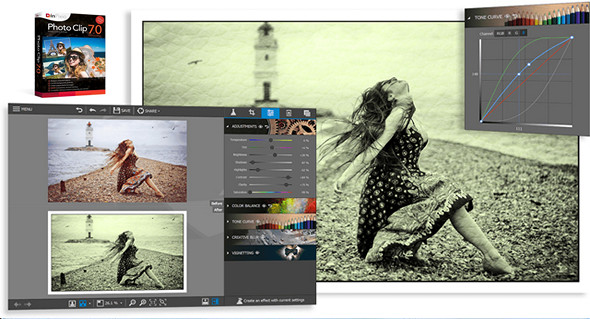
IMPROVED! Easy photo optimization
Optimize your images in just a few clicks with image processing settings:
- Temperature
– Shade
– Clarity
- Contrast
- Shadow
– Brightness
– Saturation
NEW! Rebranded Interface
The new version features an ultramodern and aesthetically pleasing user interface, developed for even easier use.
NEW! Interactive introductory exercises
Discover how to use this software and follow the exact same steps with this brief demonstration.
NEW! Share your images directly from the software.
Share your photos with friends and family on Facebook, Twitter, Flickr or via original postcards (InstaCards)
Configuration:
– Windows (x32/x64 Bits): XP, Vista, 7, 8, 8.1, 10
– Processor: 1 GHz
– RAM: 1 GB
– Disk space: 100 MB
Portable version:
1. In your file "hosts" (System32/Drivers/etc) by adding the lines:
127.0.0.1 tools.avanquest.com
127.0.0.1 api.avanquest.com
127.0.0.1 www.avanquest.com
127.0.0.1 aims.avanquest.com
2. Run the file LauncherIPC7.exe
3. Save using a key located in the file nserie.txt
Language Multilingual (including French)
Size : 88.4 MB
This article was updated on April 19, 2017