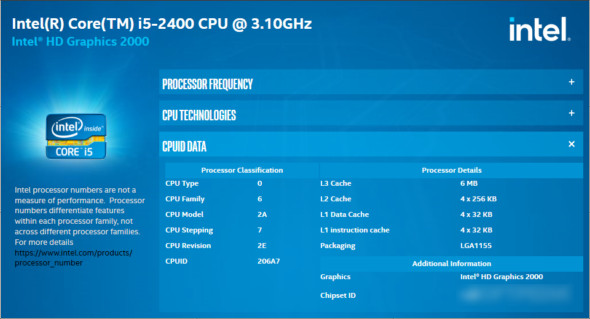
With the Intel Processor Identification Utility, you can easily obtain information about your computer's processor via the Processor Frequency Information tab, the technologies it uses, and it provides you with CPUID data and all the details.
With this utility, you can also discover the technologies integrated into your processor, where the reported value indicates the current operating speed and the expected value indicates the manufacturer's test speed. The Intel Processor Determination Utility indicates whether your Intel component uses "Virtualization" and "Hyper-Threading" technologies, as well as whether it has a 64-bit architecture.
The Intel Processor Identification Utility provides information about the processor, including cache sizes, chipset ID, and system graphics, and offers additional details about the processor type, family, model, etc. You can also use CPU-Z.
Features of the Intel Processor Identification Utility
– Define and obtain detailed information about the processor
– To provide you with accurate and correct information about the processor
– Information about the processor frequency and the technologies it uses
– Reported values for processor frequency
– It provides technologies that have been integrated into your processor
– Information on whether the processor has a 64-bit architecture
– Provides CPUID data and additional details about the processor type
Version : 6.6.15.316
Language : Multilingual (French included)
Size : 18.45 MB
Configuration:
– Windows (x32/x64 Bits): 7, 8, 8.1, 10
Intel Processor Identification Utility 6.6.15.316
This article was updated on March 24, 2021