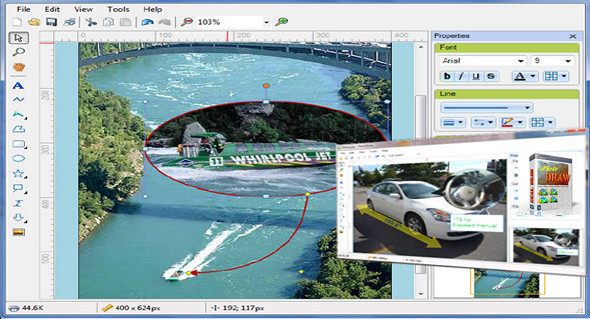
iPhotoDraw is an easy-to-use program that allows you to add various annotations to your photos. You can add descriptive text, speech bubbles, dimensions, detailed images, arrows, geometric shapes, and other annotation objects.
It features a clean and intuitive layout that allows you to upload files using the built-in browsing function or drag-and-drop operations. iPhotoDraw gives you the ability to insert text messages that can be moved to any area of the workspace simply by dragging and dropping them, and customized in terms of font, size, color, opacity, and alignment.
In addition, you can use the freehand tool to draw your own designs, insert lines, polygons, rectangles, ovals, triangles and straight arrows, attach photos, and rasterize the selected area.
The utility allows you to zoom in or out, switch to full screen mode to better focus on your work, choose the color, type and opacity of the line, bring objects to the front or send them to the back, fill objects with different colors and adjust their transparency, rotate or flip photos, and invert colors.
Finally, you can print or save the edited images as JPG, PNG, or GIF files, or copy the image to the clipboard to paste it into other tools. Note that the original image is not altered since the annotation is saved in a separate file.
Configuration:
– Windows (x32/x64 Bits): XP, Vista, 7, 8, 8.1, 10
– Processor: 1 GHz
– RAM: 512 MB
– Disk space: 70 MB
– .NET Framework 3.0 or higher
Facility :
Install the program iPhotoDrawSetup.msi
Portable version:
Run the file iPhotoDraw_portable.exe
Language Multilingual (including French)
Size 69.5 MB
This article was updated on September 16, 2017