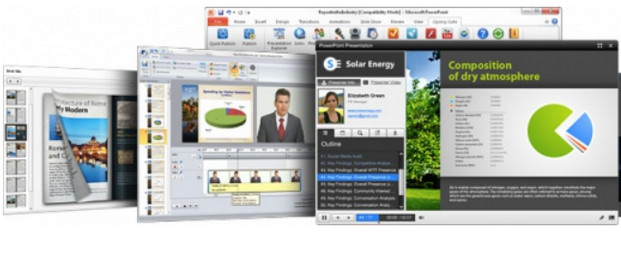
iSpring Suite 8.1 is an add-on for Microsoft PowerPoint, adding everything needed for developing online learning materials. Among other things, it allows you to:
Animations
– Triggering animations
– 189 of 199 PowerPoint animation effects 2003/2007/2010/2013/2016
– All PowerPoint 2003/2007/2010/2013/2016 transition effects
– Ability to animate a character or a word
– Disabling animation and transition effects
Multimedia
– Inserting YouTube videos
– Adding Flash clips
– Supported Video Formats: AVI/WMV/MPG/MP4
– Support for the Crop/Trim function in PowerPoint 2010 videos
– Supported audio formats: MP3, WAV and WMA
– Audio file trimming function in PowerPoint 2010
– Added background music for the presentation
– Sound playback with one click
– Support for slide and sound transitions for animation effects
– Control of multimedia content compression
– Inserting Web Objects
Advanced options
– Integration of quizzes and surveys using the iSpring QuizMaker tool
– Integration of interactions with iSpring Kinetics
– Information about the presenter and the company
– Management of references and attachments
– Publication of profiles
– Adjusting the presentation structure
– Interactive preview
– Branching-based quiz
– Importing/Exporting presenter information
– Completion status for LMS
Publication and Delivery
– Publication of SCORM/AICC compliant with LMS
– Publishing for LMS BlackBoard
– One-click publishing for iSpring Online LMS
– Folder located on my workstation
– Release on CD/DVD
– Web publication
– Sending by email
PowerPoint Content
– Microsoft PowerPoint 2010 support
– Vector representation of standard PowerPoint objects
– Proficiency in creating slides with interactive elements
– Hidden slides
– Right-to-left language handling
– Hyperlink tooltips
Notes for the slides
Actions by pointing the mouse
Custom slide ratio
Multimedia sources
– Advanced multimedia source editor for audio/video recording
– Recording or importing a video from a file
– Synchronizing a video with slides and animations
– Recording or importing an audio source from a file
– Synchronizing an audio source with slides and animations
– Sound control
Reading and Navigation
– Customizable player
– 11 reader models
– 3 display modes
– Font management
– Multi-level navigation
– Pre-loading Flash clips
– Disabling the context menu
– Customizing keyboard commands
– Option to resume the presentation
– Data import/export settings
– Disabling navigation
– Marker Tool
Presentation Protection
– Password protection
– Custom watermark
– Domain restriction
– Time limit
Output formats
– Flash file only (.SWF)
– Flash file for each PowerPoint slide
– .EXE file – if no Flash program is installed
– HTML pages
– ZIP archive
Quiz Creation
– 23 Question Categories
– Creating Quizzes or Surveys
– Combination of Graded Questions and Surveys
– Added mathematical formulas, images, and video/audio files
– Added Flash clips to the Quiz
– Answers in the form of mathematical formulas or images
– Blank slide for additional information
– Interactive preview of the quiz
– Easy-to-use interface
– Rich Text Editor
Adjustment and Control
– Setting time limits
– Passing score
– Number of attempts
– Partial answers
– Number of points awarded for each question
– Score Normalization
Customization
– Connection conditioned by user responses
– Possibility of mixing Questions and Answers
– Random questions
– Corresponding comments based on the answers
– Customizable player: messages and buttons
– 7 pre-configured player color schemes
– Multimedia Resource Compression
– Personalized scoring in Single Choice/Multiple Answer Questions
Delivery and Tracking
– Integration with SCORM/AICC compliant with LMS
– Detailed tracking for iSpring Online LMS
– Results will be received by email
– Receiving the results via the server
– Option to print the results
Quiz published
– Output file in Flash format (.SWF)
– Creation of quizzes compatible with SCORM/AICC
– Quizzes compatible with Blackboard's LMS
– Quiz in executable .EXE format – if no Flash program is installed
– HTML/XHTML code for internet browsers
– Export to Microsoft Word
– Creating a backup copy
List of Interactions
– 3D Book
– Directory
– FAQ
– Timeline
Settings
– Interaction overview
– New reader for the 3D Book
– Editing using the mouse
Multimedia
– Video Insertion
– Audio Recording
Configuration
– Windows Vista®, Windows® 7, Windows® 8, Windows® 8.1, Windows® 10
– Single-core processor (or better) 1 GHz (or faster)
– Multi-core processor recommended for optimized rendering
– Disk space: 600 MB for installation
– Memory: 2 GB or more
– Graphics card: Minimum screen resolution of 1280 x 1024
Facility
1. Install the version that suits you (x32 or x64)
2. Copy/Paste the contents of the appropriate directory (FIXFILES_X32 or FIXFILES_X64) into the installation directory (usually C:\Program Files\iSpring\Suite).
3. Launch PowerPoint: iSpring can be accessed from the main ribbon at the top of the main window.
- Language: English
- Size: 585.90 MB
This article was updated on July 21, 2016