Photo Formation is a photo effect that automatically transforms images into super creative paper formations, then uses a 3D light engine to project stunning shadows. Use it to fragment, join, weave, cut, and fold photos into fascinating, eye-catching pieces, with all the subtle creases, loops, and bends looking as if they were carefully assembled by hand.
Photo Formation comes with a library of one-touch presets to help you get started quickly, and a random button that automatically renders a variety of paper creations over and over until you get something you like. Move, rotate, and scale tools can then be used to customize each composition—the sky's the limit!
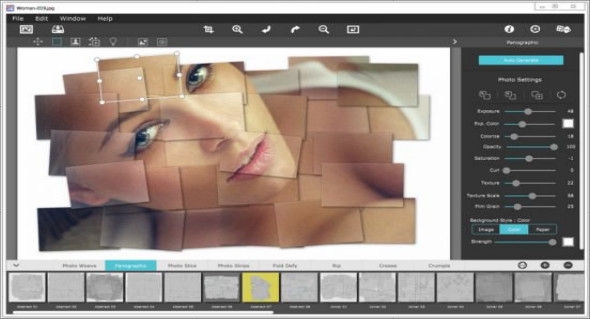
If you're the type who likes to build things from scratch, an Auto-Generate button lets you jump into creative mode by starting the initial paper effect for you, then presents a control panel so you can customize it exactly how you want. It's not as much work as it sounds; you simply specify how many stripes, squares, or folds; how many loops, creases, or depth; and whether you want exposure, opacity, texture, and grain. An Apply button returns the creation to the document where you left off by moving the paper elements (only if you want to) and adding optional photo settings.
What sets Photo Formation apart is its powerful lighting system. Oriented within a 2D space, Photo Formation displays true 3D creases and folds with all their perspective distortions, casting realistic shadows for an incredibly high-end result! The lighting is fully adjustable, and by simply moving it around the document, you can change the direction of the shadows. You can also set up multiple light sources by duplicating the light to create fantastic double and triple shadows—however many you use depends!
Photo Formation is available as a standard application or within your workflow with an included plug-in for: Photoshop, Elements, Lightroom, PaintShop Pro, and Affinity Photo.
INCLUDES 8 creative paper styles
• Photo Weave renders one or more photos in a basket weave
• Panographic transforms a photo into a patchwork of several photos
• Photo Slice uses a line tool to cut or extract photos
• Photo strips automatically cut a photo into strips and transform them into shapes
• Fold Defy automatically folds a photo with a 3D perspective to lift it
• Rip uses a lasso tool to tear the corners of an image and rip holes anywhere on your photo
Photoshop plug-in
Each product includes a plug-in for use with Photoshop, Elements, Lightroom, and PaintShop Pro. Supports actions, transparency, blending, last filter command, batch processing, and 16-bit RGB/greyscale modes.
PLUGIN HOST NEEDS
• Adobe Photoshop CS3+, CC, CC 2014, CC 2015, CC 2017, Photoshop Elements 10+ and Lightroom 4+
Configuration:
– Windows (x64 Bits): 7, 8, 8.1, 10
– Processor: 1 GHz
– RAM: 1 GB
Language : English
Size : 126.5 MB
This article was updated on July 6, 2018