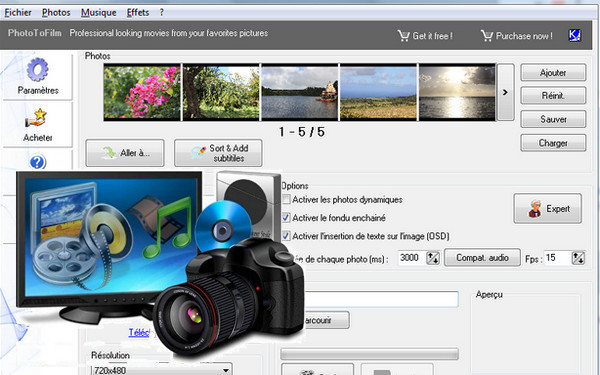
PhotoToFilm lets you create videos from your digital photos and compress them to send to your loved ones. You can choose which codec you want to use (x264vfw, XviD, etc.) and easily add effects to your videos.
– Choose the photos that will be part of the presentation, with the option to arrange them in the corresponding order.
– Add an audio track for the presentation.
– Activate the transitions, with different effects.
– Choose the video codec to use.
– Choose the video output resolution.
– Insert dynamic text.
– Introduce the name of the presentation video.
Configuration:
– Windows: 10/8/7/Vista/XP
– Intel® Pentium® 1 GHz processor or equivalent
– 1 GB of RAM
– 100 MB of disk space, mouse and keyboard
– Internet connection
Facility:
– Launch “PhotoToFilm_setup.exe”
– You are being offered the adware “Relevant Knowledge”, you must select “Decline”
– At the end of the installation, uncheck “Launch PhotoToFilm” and “KC Softwares Website”
– Copy/Paste/Replace “PhotoToFilm.exe” in the installation directory
– Launch the software and click on “Enter the license”
– Enter the information from the file “ser.no.txt”
- Language: Multilingual
- Size: 2.2 MB
This article was updated on September 7, 2016