A short tutorial allowing you to find out the age of your computer in just a few clicks.
You can determine the age of your computer by identifying the exact date your machine's BIOS was created. Let's see how it works!
How to set the creation date of your BIOS!
Method 1: Using the DEBUG command
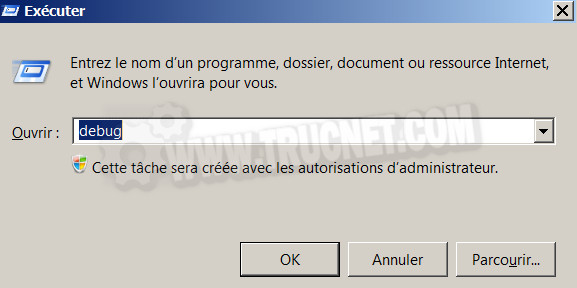
Open the command window Execute via the keys Windows + R from your keyboard. Enter the command debug and click the "OK" button.
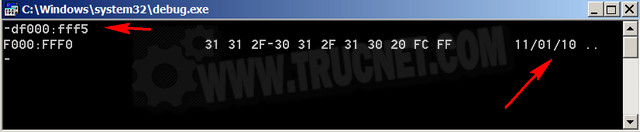
A black window will appear…
Enter this code df000:fff5 (These are not O's, they are "zero" O's.)
Noticed : If you cannot type ":" (English keyboard) use the Shift+M keys! The date will then be displayed in the top right corner.
Method 2: Via System Information
Here's a second, easier method!
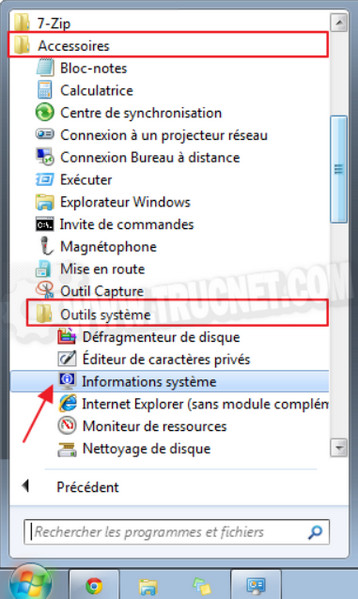
Open To start up and go towards: All programs > Accessories > System tools > System information
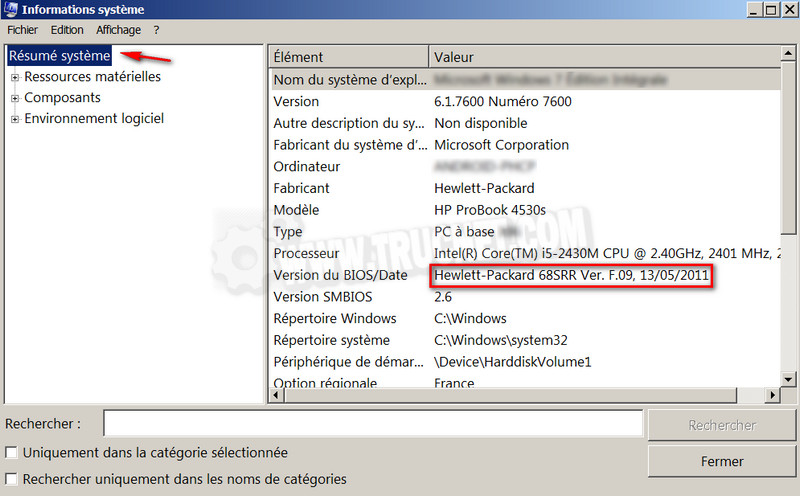
In System summary You will receive several pieces of information…Among these pieces of information you will find “ BIOS Version/Date ", the value is the BIOS build date which is the Date your computer was built!
This article was updated on February 19, 2016