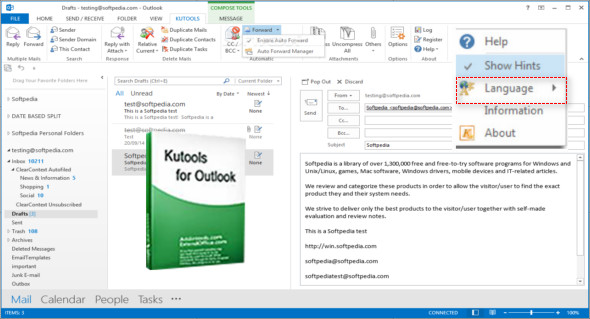
Kutools for Microsoft Outlook is a tool that brings together more than 20 functions and tools for Microsoft Outlook and simplifies email communication through Outlook by adding useful features that users rely on daily. The Kutools tab will appear in the Outlook toolbar when you compose a new message (email) or reply to an email. This tool supports Outlook versions 2010, 2013, 2016, 2019, and 365 (32-bit and 64-bit).
Main features
– Easily configure automatic out-of-office replies without Exchange Server
– Automatically CC/BCC each email sent and easy to customize rules
– Forward multiple emails individually with one click
– A powerful spam filter helps reduce unwanted messages in your inbox
– A host of one-click operations: such as deleting duplicate emails/contacts, etc.
Several emails
– Reply (multiple emails): You can quickly reply to multiple emails at once. Note: Select the multiple emails you want to reply to simultaneously, then apply this utility.
– Forward (multiple emails): With this utility, you can quickly forward several individually selected emails at once. Note: Select the multiple emails you want to forward, then use this utility.
Delete emails
– Delete by sender: Delete all messages (emails) from a sender in the current mail folder. Note: Please select a message (email) for which you want to delete all messages with the same sender.
– Delete by subject: Deletes all messages (emails) with the same subject from the current mail folder. Note: First, select a message containing the subject, then use the utility to delete all messages with the same subject as the selected message (email).
Remove duplicates
– Delete duplicate messages: Remove duplicate messages from email folders and keep only one. Note: Please click to open an email folder from which you want to delete duplicate messages.
– Remove duplicate contacts: Delete duplicate contacts from your contact list and keep only one. Note: First, go to the Contacts or People folder (Outlook), then apply this utility.
– Remove duplicate tasks: Delete duplicate tasks from the task folder and keep only one. Note: Access the task folder first, then apply this utility.
Configuration:
– Windows (x32/x64 Bits): 7, 8, 8.1, 10
– Outlook: 2010, 2013, 2016, 2019 and 365 (32-bit and 64-bit)
– Processor: 1 GHz
– RAM: 1 GB
Language : Multilingual (French included)
Size : 38.2 MB
This article was updated on October 21, 2018