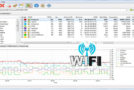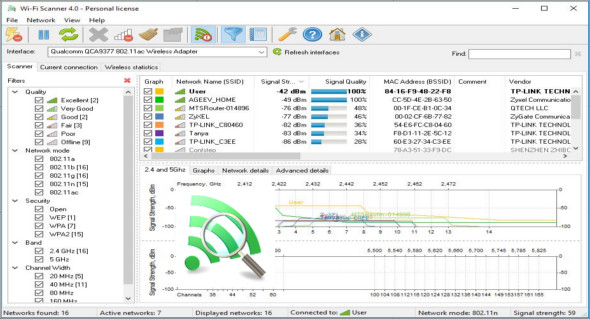
Wi-Fi Scanner allows you to easily locate visible wireless networks and their corresponding information. The tool obtains the network name (SSID), signal strength (RSSI) and quality, MAC address (BSSID), channel, maximum and achievable throughput, security, and much more.
Wi-Fi Scanner is useful for users of standard access points who need to know the signal strength distribution for their home wireless network, or to choose a location for their access point for optimal signal quality. You can also use TamoSoft CommView for WiFi.
Using Wi-Fi Scanner, you can assess the allocation of wireless networks by channel and select the least congested bandwidth for their access point, allowing them to significantly increase their connection speed.
In addition, Wi-Fi Scanner is an indispensable tool for enterprise network administrators in performing tasks such as configuring, scheduling, and monitoring security settings on enterprise wireless networks.
Features of Wi-Fi Scanner:
– Quick and easy wireless network search
– Supports 802.11ac and 802.11a/b/g/n
– Supports 2.4 and 5 GHz frequency bands
– Supports channel widths of 20, 40, 80, 160 and 80 + 80 MHz
– Display detailed information about the wireless network: network name (SSID), signal level (RSSI), MAC address (BSSID), signal quality, channel, possible and maximum data rate, encryption, channel usage, clients, etc.
– Display the detailed description of the information elements (IE)
– Detect WEP, WPA, or WPA2 security standards for wireless networks
– Supports WPS 1.0 and WPS 2.0
– Discovery of the device name and model number of the access points
– Display signal level changes over time in graphical form
– Display signal spectrum mask for each wireless network
– Customizable graphic color for any wireless network
– Filter the list of detected wireless networks by specified parameters (quality, network mode, security, etc.)
– Connect to detected networks
– Display the status of the Wi-Fi radio (software, hardware)
– Display wireless connection settings
– Display wireless connection statistics in the form of graphs and tables
– Manage wireless connection profiles
– Disconnect/connect wireless adapters
Version : 22.10 /Mobile: 22.08
Language : Multilingual (French included)
Size : 10.82 MB
Configuration:
– Windows (x32/x64 Bits): 7, 8, 8.1, 10, 11
LizardSystems Wi-Fi Scanner 22.10 + Portable
This article was updated on October 3, 2022