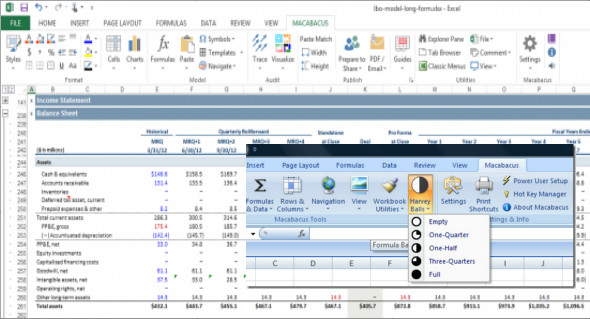
Macabacus is the most comprehensive suite of productivity add-ins for Excel, PowerPoint and Word, with tools to improve financial modeling and presentation preparation efficiency.
Build financial models and presentations more effectively
– 80 % + saves time on routine tasks
– Power modeling tools
– Advanced formula
– Audit
– Mapping tools
– Dozens of keyboards
– Shortcuts
– Reliable link to Excel
– Table of Contents
– Calendar automation
– Check the presentations for errors
– Shared content and
– Template libraries
– Find and navigate
– More easily
– Optimizing workbooks
– Extensive customization
– Business deployment
Reduce errors with powerful and efficient auditing tools — absolutely essential for experienced users
– Effortlessly navigate formula entries across worksheets and workbooks, using only the keyboard
– Similarly, navigate through a cell's dependencies, indicating the formulas and charts that the audited cell leads to
– Explore the precedents/dependents using tree navigation to help you understand everything that drives your formulas
– Analyze complex formulas piece by piece to see which part of the formula contributes to the overall result
– The visualizations highlight formula errors and outliers.
– See the trace arrows of previous/dependents for multiple cells at once or when navigating between cells.
Keep your presentation agendas updated so you can focus on the content
– Seamlessly synchronize agenda slides with native PowerPoint sections
– Deep integration with PowerPoint sections keeps your agendas up to date when sections are added, deleted, moved, or renamed.
– Supports both agenda styles: displaying agendas on (a) a table of contents slide, or (b) spreadsheets (separator slides at the beginning of each section)
– Display section/subsection titles on content slides that automatically update when the agenda changes
– Intelligently reduce the number of subsections to fit more agenda items onto a single slide and improve readability
– Intelligently omit loose section sheets to reduce presentation length and printing costs
– Avoid displaying spreadsheets back-to-back during slideshows.
– Include slide titles or other text in your table of contents
– The appearance of the planner/flysheet is fully customizable
Export cells and charts from Excel to PowerPoint and Word more easily and professionally.
– Export cells and charts to PowerPoint and Word as images, embedded workbooks, tables, charts, etc.
– Hide Excel interface elements (blue print preview borders, red cell comment indicators, gridlines, etc.) and automatically crop fonts for more professional output.
– Automatically check for formula errors in the data you export, preventing embarrassing mistakes in your presentations and documents
– Imported shapes (e.g., images, tables) are positioned and sized intelligently, avoiding the tedious adjustments required for natively pasted shapes.
Improve the quality of the presentation and avoid embarrassing mistakes
– Check the slides for formatting, layout, content, grammar errors, and inconsistencies before sending a presentation to a client or printing
– Improve compliance with your corporate design standard and brand
– Over 100 checks for issues such as hyphenation and abbreviation of inconsistent words, missing footnotes, color palette discrepancies, incorrect bullet formatting, missing punctuation, missing labels, image distortion, etc.
– Unlike other solutions, Macabacus checks graphics and SmartArt
– To see exactly where the problems are, the detailed explanations of the problems, and the frequencies of occurrence where inconsistencies are found
– Resolve problems with a customized menu of fixes that highlights the dominant conventions in your presentation to help you choose a fix
– Define the proofing language for an entire presentation at a time to correct words marked as misspelled that are clearly not.
Link PowerPoint and Word data to Excel with reliable links
– Link cells and charts in Excel to shapes and text in PowerPoint/Word, and update links with the click of a button
– Unlike native Office links, Macabacus links are not broken when the structure of your source spreadsheet changes, which is certain
– Reduced file size for presentations/documents related to embedding workbooks required for native Office integration
– The inline text link in PowerPoint and Word allows you to write paragraphs with numbers from an easily updatable spreadsheet
Version control helps identify the most recent versions of source files when updating links, and recommends relinking options.
– Automatic link detection supports files shared in the cloud using a service such as Dropbox
A repository for reusable content and templates shared by all users in your organization
– Shared libraries accelerate preparation and facilitate the standardization of presentations, spreadsheets, and documents
– The library content may include slides (e.g., team pages), Office shapes (e.g., icons), images (e.g., client logos), charts, and more.
– Library templates can include presentation templates, spreadsheet templates (to be used as starting points when creating new templates) and document templates (e.g., fax cover pages).
– Slides inserted from the library are linked and can be updated to the latest version in the library with the click of a button
– Google-style text search instantly returns the corresponding content
– Create “document groups” to categorize published templates by business unit or any other category
– Macabacus supports 3 libraries: a personal library for individual use and shared team and enterprise libraries
– Locally caches remote libraries for offline availability
– Administrative privileges are required to modify the company library
Working with charts in Excel has never been easier.
– Easily create complex charts used in finance and consulting, including waterfall, football field, butterfly and Marimekko charts.
– Insert pre-populated Macabacus charts with dummy data without working with complex chart data structures
– Add CAGR arrows to histograms that update as the chart data changes. Extensive formatting options give you the exact look you want.
– Easily add total labels above columns in a stacked column chart
– Recolor the data series in a table to your preferred colors in two mouse clicks
– Stack charts to create a dashboard and quickly adjust the size and position of chart/plot areas for multiple charts at once
– Working with data labels more efficiently
– The graphs created with Macabacus are 100% native % — you don't need Macabacus to work with them
– Reduce the time your graphic professionals spend creating and modifying graphics for internal clients
Virtually unlimited customization options meet the needs of even the most important institutions.
– Configure the Macabacus settings (colors, fonts, templates, etc.) to reflect your company's brand identity and design standards
– Customize the behavior of many non-formatting tools to reflect personal or organizational workflow preferences
– Deploy customizations for all users to conform the appearance of Office documents to a single standard and standardize the Macabacus experience for all users
– Save settings to the cloud for consistency across all your devices
– Accelerate deployment with customization services (at an additional cost) that translate your design standard into Macabacus settings.
Compatibility:
Macabacus is designed for use with Microsoft Office 2016, 2013, and 2010 (32-bit and 64-bit) installations for Windows 10, 8.x, and 7 (32-bit and 64-bit). It no longer supports Office 2007.
New :
– [Excel] Improved Pro formula editing behavior for previous formulas on other worksheets
– [PowerPoint] Added proofing check for shapes located outside the margins of the left and right slides defined by the body placeholder on the slide master.
Configuration:
– Windows (x32/x64 Bits): 7, 8, 8.1, 10
– Processor: 1 GHz
– RAM: 1 GB
– Disk space: 100 MB
Language : English
Size 45.7 MB
This article was updated on March 27, 2018