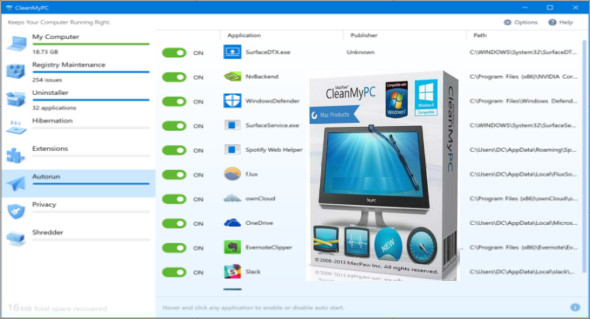
CleanMyPC is software that repairs errors, cleans, and maintains your Windows system, thus speeding up your computer's performance. This program includes six main and important tools for performing the above tasks: Secure Wipe, Complete Uninstall, Registry Maintenance, Autorun, Privacy Protection, and Gadget and Extension Manager.
Secure erasure
Files and folders deleted using "Secure Erase" cannot be recovered. This is possible by overwriting files multiple times with zeros ("zero-out") before permanently deleting them from your hard drive.
Complete uninstallation
The "Complete Uninstall" feature will help you remove applications without leaving a trace. To do this, you must follow the on-screen instructions to launch a factory uninstallation program, and once it has finished, CleanMyPC will retrieve it and proceed to remove any unnecessary remnants.
Registry cleaning
The Windows Registry is a database that stores configuration settings and options for Windows itself and all installed applications. Because the registry is simultaneously read from and written to by all installed applications, which can also include malware and spyware, it can sometimes become cluttered or partially corrupted. This cannot be fixed manually (unless you have extensive technical knowledge and experience). To scan your computer's registry for problems, click "New Registry Scan" and wait for the scan to complete. CleanMyPC will find erroneous entries and offer to fix them all at once or selectively.
Autorun
Manually removing autorun applications is usually inconvenient and sometimes beyond your control—Windows stores autorun data in multiple locations, making it difficult to find a specific application. CleanMyPC gathers all applications that start with Windows into a simple interface: simply hover over any application and click the corresponding "Disable" button to prevent it from starting with Windows. You can re-enable it in the same way.
Privacy protection
CleanMyPC scans all your browsers to collect traces of your online activity in one place. No need to dig through browser settings to clear cookies or login data: simply press a button to erase your entire online history.
Gadget and Extension Manager
CleanMyPC lists all the extensions you can remove and lets you delete them all at once or only the ones you want to remove. This action cannot be undone, so be sure not to delete gadgets or extensions you might need in the future.
Additional utilities
In addition to cleaning and scanning functions, CleanMyPC comes with a suite of built-in utilities designed to help you keep your computer reliable, fast, clean, and running like new.
Version : 1.10.8.2063 /Mobile: 1.10.7.2050
Language : Multilingual (French included)
Size : 27.00 MB / Portable: 54.83 MB
Configuration:
– Windows (x32/x64 Bits): 7, 8, 8.1, 10
MacPaw CleanMyPC 1.10.8.2063
MacPaw CleanMyPC Portable 1.10.7.2050
This article was updated on July 12, 2022