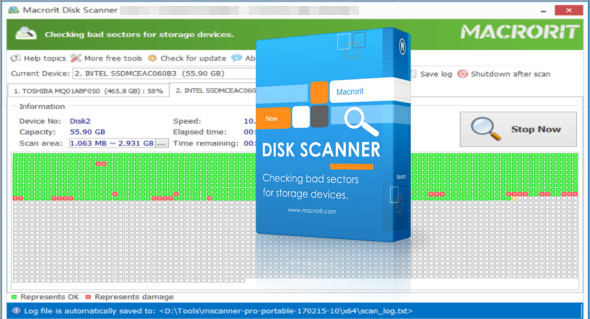
Macrorit Disk Scanner is an application that helps you quickly select a disk and locate bad sectors. It's a smart program for checking your hard drive for unreadable bad sectors. You can also use Disk Storage Low Level Pro Format.
The program supports a wide range of disks, so you can use it to determine the overall health of your drives. Supported devices include iPods, micro SD cards, memory cards, USB flash drives, FireWire hard drives, SSDs, USB hard drives, floppy disks, Zip drives, RAID arrays, and more.
Macrorit Disk Scanner Features
– Scan all the discs at the same time
– Analyze and erase all bad sectors on the disks
– Supports scanning and analysis of the entire disk, partition, and free space
– Support for selecting/selecting a portion of the disk/partition for analysis only.
– Support for automatic computer shutdown when scanning is complete
– Supports a large number of disks
– Automatically save the analysis results to the specified location
Ultra-fast disk analysis
Mark the good sections in green and the errors in red
– Handles the force to close or stop the scanning process.
Version : All editions 5.1.2 /Portable: Technician Edition 5.1.2
Language : Multilingual (French included)
Size : 26.62 MB
Configuration:
– Windows (x32/x64 Bits): 7, 8, 8.1, 10, 11
Macrorit Disk Scanner 5.1.2 + Portable
This article was updated on October 7, 2022