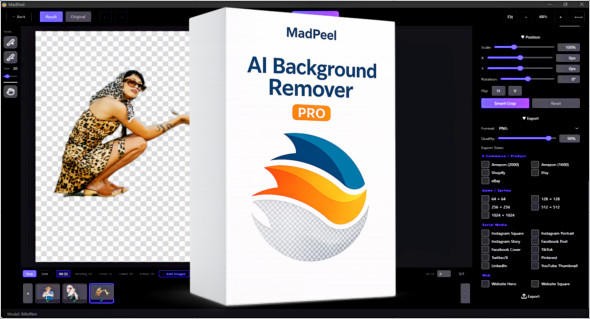
MadPeel – AI Background Remover is a modern software designed to automatically remove image backgrounds using advanced artificial intelligence. This tool delivers clean, professional-looking cutouts in just seconds, without requiring complex photo editing skills. Whether you're a content creator, photographer, online retailer, or graphic designer, MadPeel offers a simple and effective solution for isolating a subject and creating images ready for use across various platforms.
One of MadPeel's main advantages is its 100% offline operation. Unlike many online services that require you to upload your photos to external servers, MadPeel processes all images directly on your computer. This ensures complete confidentiality and enhanced file security, which is especially important for professionals working with sensitive images or commercial content.
Artificial intelligence optimized for different types of images
MadPeel integrates several artificial intelligence engines to adapt to different types of photos. The application offers three main AI modes that allow it to obtain the best results depending on the subject of the image.
THE Best Quality Fashion This mode is designed for general images, including products, objects, or marketing visuals. It prioritizes precision and allows for sharp, detailed outlines.
THE Portrait mode is specially optimized for photos of people. It analyzes the contours of the face, body and clothing to produce a natural and realistic result.
Finally, the Hair Detail Fashion It focuses on fine details such as hair, fur, or semi-transparent elements. This mode is particularly useful for avoiding the artificial effect often seen with basic background removal tools.
Precise editing tools to improve every cut
In addition to automatic background removal, MadPeel offers several advanced editing tools to refine the final result. Users can employ an add or remove brush to manually correct specific areas. These tools are fully customizable, allowing users to adjust the brush size and hardness for precise work.
The application also includes edge refinement tools, such as sharpness adjustment, contour expansion or contraction, border blurring, and color fringing correction. These features are particularly useful for achieving a professional result.
MadPeel also offers an Auto-Enhance function, which automatically analyzes the cut made by the AI and applies optimized settings to improve image quality.
Background and visual effects management
Once the background is removed, MadPeel makes it easy to add a new one. The user can choose a transparent background, a solid color, a gradient, or a custom image.
The software includes several predefined gradients inspired by popular styles, such as Sunset, Ocean, Midnight, and Golden Hour. These options allow you to quickly create modern and attractive visuals.
MadPeel also offers various drop shadow effects to add realism to the image. Several styles are available, such as Soft, Hard, Floating, and Dramatic. Each shadow can be customized by adjusting the blur, opacity, distance, angle, and color.
Batch processing to save time
For users who need to process numerous images, MadPeel includes a batch processing function. This feature allows for the automatic processing of multiple images or entire folders in a single operation.
The integrated queuing system allows you to manage image processing with options to pause, resume, or discard certain photos. The processed files are then automatically saved in organized folders.
This feature is particularly useful for e-commerce stores, photographers, or marketing agencies that regularly work with a large number of images.
Export optimized for online platforms
MadPeel also makes image publishing easy with its 22 export presets tailored to major digital platforms. Images can be automatically prepared for Amazon, Shopify, Etsy, eBay, Instagram, TikTok, Facebook, Pinterest, LinkedIn, or YouTube.
The software allows exporting files in various popular formats such as transparent PNG, JPEG and WebP, with complete control over image quality.
Fast performance thanks to GPU acceleration
To accelerate image processing, MadPeel uses GPU acceleration. The software can leverage the power of NVIDIA or AMD graphics cards to reduce processing time. If no compatible graphics card is detected, the application can run using only the CPU.
A complete solution for creating professional images
MadPeel supports several common image formats, including PNG, JPG, WebP, BMP, TIFF, and GIF. Images can be easily imported using a drag-and-drop function, simplifying the workflow.
The application also includes a before/after comparison tool as well as a zoom of up to 10x, allowing for precise inspection of contours.
Thanks to its many features, MadPeel is an effective solution for quickly creating professional visuals for e-commerce, social media, digital marketing or graphic design.
There is also an alternative called AI Image Background Remover Pro, which you can discover here:
https://www.trucnet.com/ai-image-background-remover-pro/
Conclusion
In summary, MadPeel – AI Background Remover is a comprehensive and powerful tool for quickly and accurately removing image backgrounds. Thanks to its various artificial intelligence modes, advanced editing tools, and 100% offline functionality, it's an ideal solution for content creators, photographers, and e-commerce professionals. Easy to use and feature-rich, MadPeel allows you to produce clean, professional visuals in just a few clicks.
Version : 1.0.0
Language : English
Size : 1.68 GB
Configuration:
– Windows (x32/x64 Bits): 10, 11
Download MadPeel – AI Background Remover v1.0.0
This article was updated on March 5, 2026